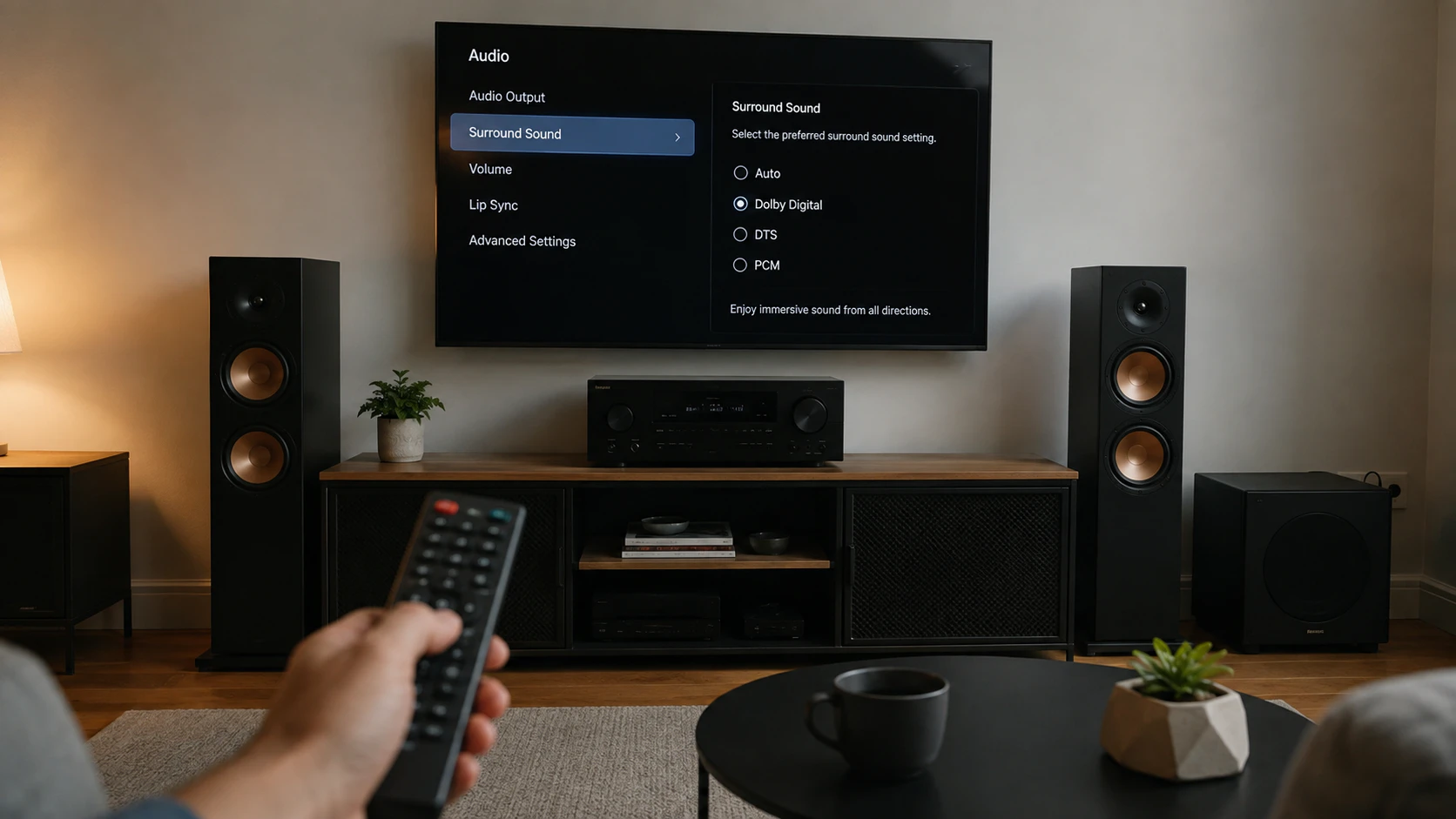
Surround sound not working after a firmware update? It’s almost always because the update reset your audio output to stereo PCM, broke the HDMI-CEC/eARC handshake, or changed the format your TV sends out. Nothing is broken: it’s a matter of re-fixing three things – the digital audio output (set to passthrough/bitstream), the eARC/ARC + CEC link, and the correct HDMI port and cable.
This guide is about the sound: it covers every setup (TV to an AV receiver, to an amplifier or to a soundbar; with or without a PC; over HDMI ARC, eARC or optical) and every format (stereo, Dolby Digital, DTS, Dolby Atmos and DTS:X), with the steps per brand. Use the index to jump straight to your case.
Why is your surround sound not working after an update?
A firmware update usually resets hidden audio settings to their factory defaults and renegotiates the digital link with your sound system. In practice, one of these three things happens, or several at once:
- The audio output drops back to stereo PCM. The TV stops sending the multichannel stream (Dolby/DTS) and outputs just two channels: you hear sound, but flat and with no surround.
- The eARC/ARC and CEC link drops. The “HDMI control” that powers on and syncs your gear turns off or half-connects, and the receiver gets no signal (or gets it and doesn’t recognise it).
- The port pairing is lost. The HDMI handshake between TV and receiver gets corrupted; until it’s fully power-cycled, one won’t “see” the other.
The good news: because it’s a misconfiguration and not a fault, re-setting those points fixes it. And if the update itself introduced the bug (it happens), sometimes the only real cure is the manufacturer’s next patch, or rolling back to the previous version. Let’s go step by step.
Identify your connection setup
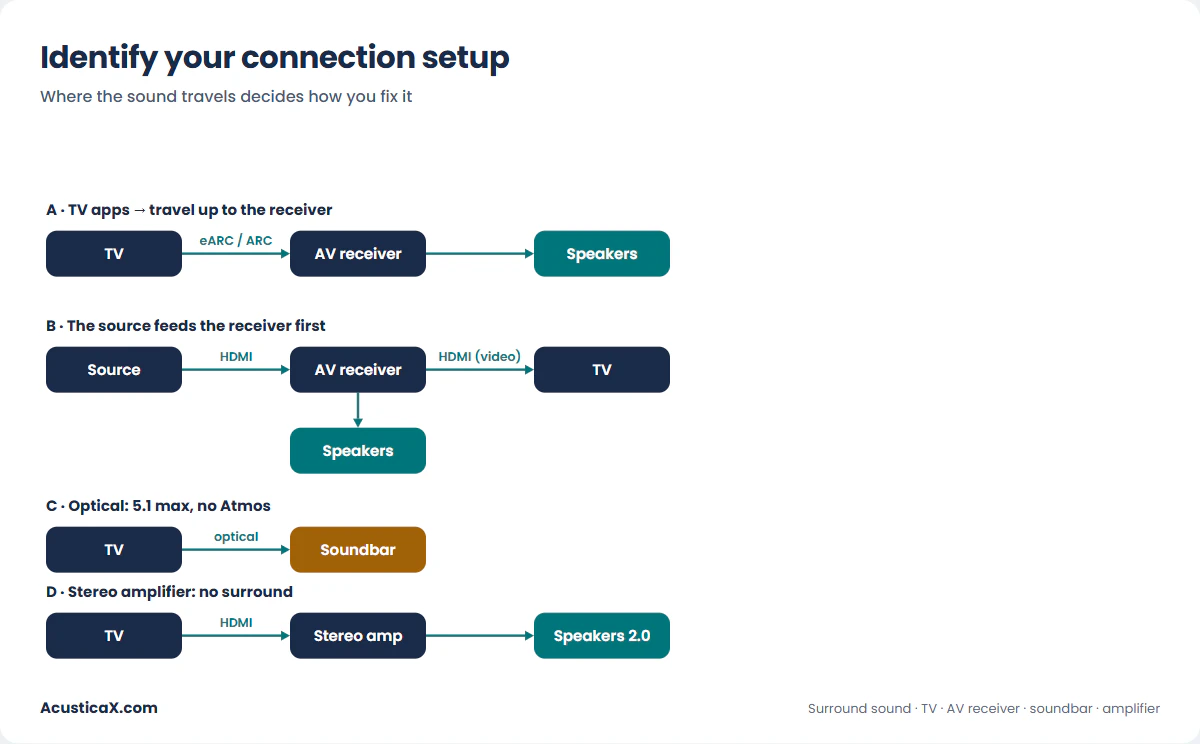
Before you touch anything, work out where your sound travels, because the fix depends on the wiring. There are four typical setups:
- A · TV apps → eARC/ARC → receiver or soundbar. Sound from Netflix, Prime Video or the built-in Google TV travels up from the TV to your gear over the HDMI audio return channel. It’s the most common setup and the one most sensitive to updates.
- B · Source → receiver → TV. A Blu-ray player, a console, an Apple TV or a PC feeds the receiver first; the receiver decodes the audio and passes the picture to the TV. It’s the best path for sound: surround doesn’t depend on ARC/eARC.
- C · TV → optical → soundbar or amplifier. The classic Toslink connection. It works, but it’s capped at Dolby Digital and DTS 5.1: optical carries no Atmos and no DTS:X.
- D · TV → stereo amplifier (2.0/2.1). There’s no surround here by design: the TV downmixes to two channels. The goal is a clean stereo mix.
ARC, eARC and optical: which sound each one can carry
This is the key to almost every “I only get stereo” and “no Atmos reaches my receiver”. Not every connection carries the same formats. HDMI ARC runs at ~1 Mbps and eARC at ~37 Mbps, and that bandwidth gap decides which sound gets through:
| Audio format | Optical | HDMI ARC | HDMI eARC |
|---|---|---|---|
| Stereo PCM (2.0) | Yes | Yes | Yes |
| Dolby Digital 5.1 | Yes | Yes | Yes |
| DTS 5.1 | Yes | Yes | Yes |
| Dolby Atmos (lossy, over Dolby Digital Plus) | No | Yes | Yes |
| Dolby Atmos lossless (over Dolby TrueHD) | No | No | Yes |
| DTS:X / DTS-HD Master Audio | No | No | Yes |
| Multichannel PCM (uncompressed 5.1 / 7.1) | No | No | Yes |
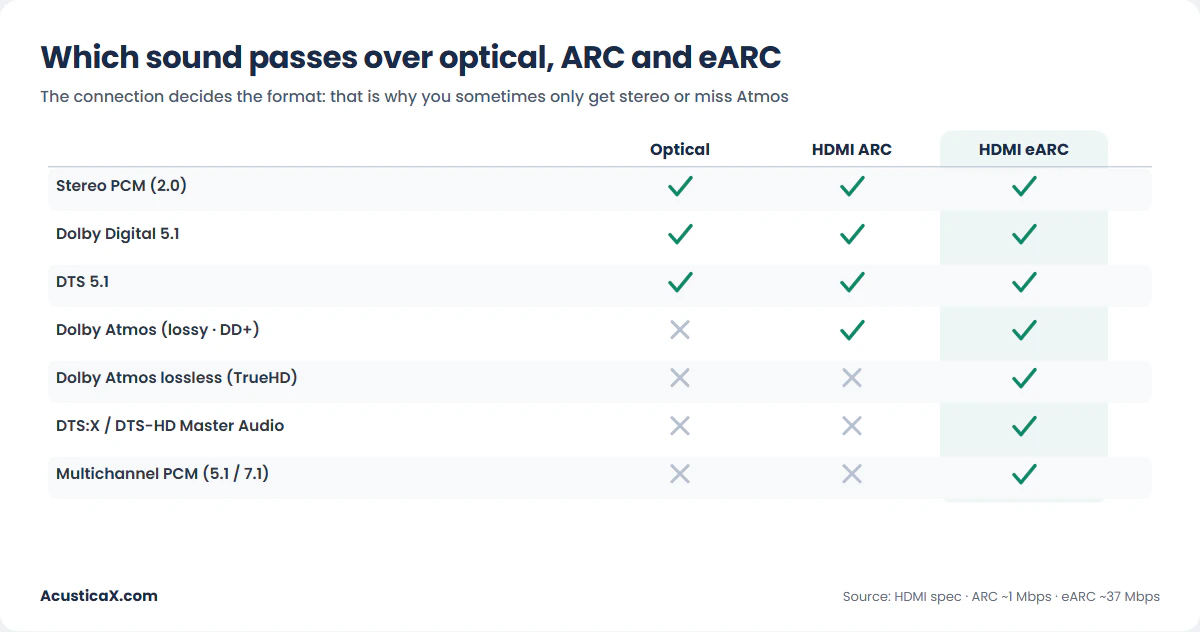
The practical takeaway: if after the update you only get 5.1 and no Atmos, you’re probably running over ARC (or optical) instead of eARC, or the TV fell back to a compressed mode. For eARC, use an Ultra High Speed HDMI cable, the kind designed for it, plugged into the ports labelled “eARC” on both devices. eARC data rides the HDMI Ethernet channel, so a High Speed cable with Ethernet may work, though it isn’t certified for eARC, and an old cable can cause dropouts or fail to lock at all.
Sound gone after the update: the step-by-step fix
This order solves the vast majority of setup-A cases (TV apps → receiver/soundbar). Work top to bottom:
- Power everything off and unplug it for a minute. TV, receiver/soundbar and sources, from the wall (not just standby). A minute drains the capacitors and forces a clean HDMI handshake on the way back. Turn the sound system on first, then the TV.
- Set the digital audio output back to passthrough. On the TV, find the digital audio output and switch it from PCM to “Pass-through” / “Bitstream” / “Auto”. This is the setting updates tend to reset, and the number-one cause of “stereo only”.
- Re-enable eARC/ARC and CEC. Toggle them off and on again (cycling “HDMI control” re-establishes the link). Make sure CEC is on both devices.
- Check the port and the cable. The cable must go into the HDMI port labelled “eARC/ARC” on the TV and on the receiver (not any HDMI). For lossless Atmos/DTS:X, use an Ultra High Speed cable.
- Look for a patch or roll back. If none of the above fixes it, check whether the manufacturer released a newer firmware that addresses the bug, or roll back to the previous version from the TV/receiver menu. These bugs are often fixed in the next update.
Diagnose it by symptom
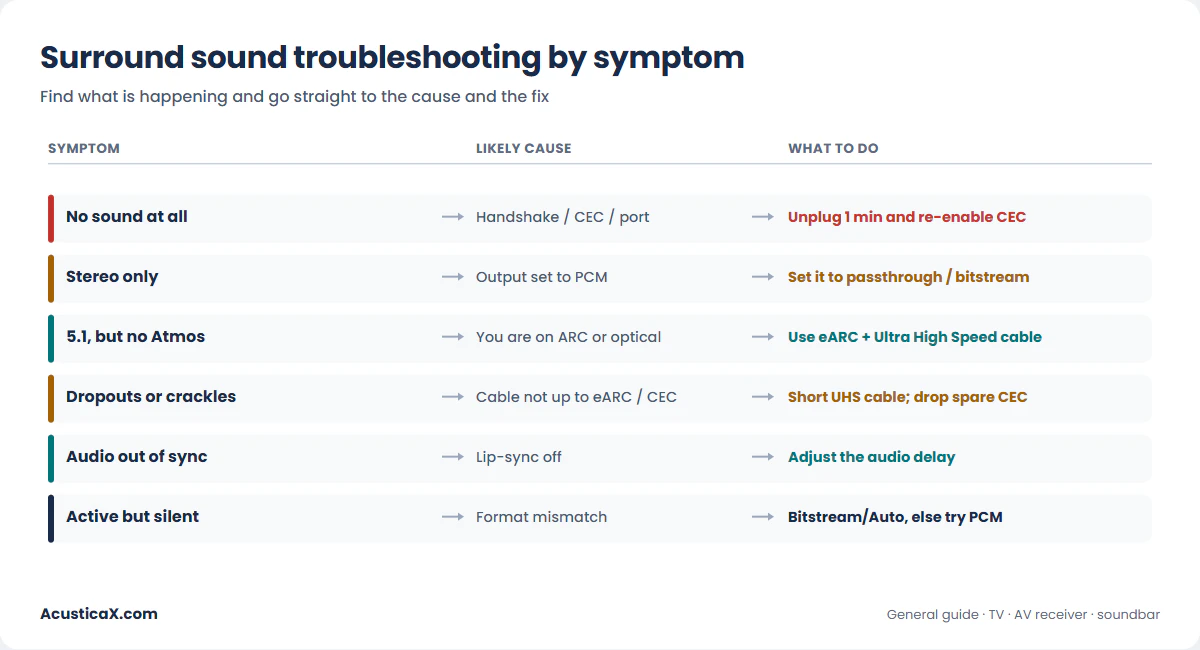
Find what’s happening to you and go straight to the most likely cause.
No sound at all
Start with the handshake: unplug for a minute and re-enable CEC. Confirm the cable is in the right eARC/ARC port and that the TV has its audio output set to the receiver (not “TV speakers”). If the receiver shows “no signal”, try another cable, or use optical as a test: if optical works, the problem is the HDMI link.
Sound plays, but stereo only (no surround)
Almost always the audio output is on PCM instead of passthrough/bitstream. Switch it and play content that actually carries 5.1 (many apps and channels broadcast in stereo). If the receiver still shows 2.0 with a known 5.1 source, check the receiver’s sound mode isn’t forced to “stereo”.
You get 5.1, but no Dolby Atmos or DTS:X
This is a connection-bandwidth issue (see the table above). App Atmos needs at least ARC; lossless Atmos and DTS:X need eARC and an Ultra High Speed cable. Check you’re on the eARC port, that eARC is enabled, and that the app or player is set to output Atmos (that gets reset too, sometimes).
Intermittent dropouts or crackles
Typical of an HDMI cable that isn’t up to eARC, or of CEC “fighting” between devices. Try a short, quality Ultra High Speed cable and, if it persists, turn off CEC on the devices in the chain you don’t need it on (each brand names it differently). A recent firmware that touched eARC can also be the culprit.
Audio out of sync (sound lags the picture)
Adjust the audio delay (lip-sync) on the TV or receiver. eARC includes automatic correction, but an update can leave it off. If you want to measure the real offset in milliseconds and dial it in exactly, you can use our audio delay calculator and set a number instead of guessing.
The receiver shows “active” but there’s no sound
The link is there, but the format doesn’t match: the TV is sending a codec the receiver can’t decode. Put the TV on bitstream/auto and, if it’s still silent, on PCM as a test: if PCM plays, it’s a format problem, not a connection one.
Where the settings are, by brand
Every maker hides the audio output and HDMI control somewhere different, and calls CEC by its own name. On current models:
- Samsung (Tizen, S and QN series). CEC = Anynet+. Sound → Sound Output (pick “Receiver HDMI/optical”), and Expert Settings → Digital Output Audio Format (Auto/Pass-through). eARC lives under Expert Settings → “eARC Mode”.
- LG (webOS, OLED C and G series). CEC = SIMPLINK. Sound → Sound Out → “HDMI (ARC) device”, with Digital Audio Output set to Pass-through. eARC is under Sound → eARC Support (or inside SIMPLINK).
- Sony (Google TV / Bravia). CEC = Bravia Sync. Settings → Display & Sound → Audio output → “Audio system”, with eARC mode on “Auto”. This is the built-in Google TV case: after an update, restart the system and re-enable Bravia Sync.
- Panasonic (VIERA Link) and Philips (EasyLink). Same idea, different name: enable HDMI control and set digital audio output to Auto/Bitstream.
- Receivers (Denon, Marantz, Yamaha, Onkyo/Pioneer, Sony). They get firmware too: confirm the input assigned to eARC is correct, that “HDMI Control” is on and, after an update, reset the receiver’s video/HDMI section (most have a micro reset that leaves the room calibration intact).
Special cases
With a PC over HDMI
If the sound comes from a PC, surround depends on the Windows audio configuration: on the HDMI output device, open Configure and pick 5.1 or 7.1, then in Properties enable the formats your receiver supports. For Dolby/DTS bitstream you’ll need the app (player, platform) set to “passthrough”. If Windows is on “Stereo”, no matter how good your receiver is, only two channels come out.
The source has its own setting too (console, Apple TV, stick)
If the sound originates in a console (PS5, Xbox Series), an Apple TV, a Fire TV or a Chromecast, that device has its own audio output and it also ends up misconfigured after an update. Go into its sound settings and enable bitstream/Dolby (and Atmos if it supports it): a PS5 on “Linear PCM” or an Apple TV without “Dolby Atmos” turned on will send less than your gear can handle, however well the rest of the chain is set. And remember: if that source feeds the receiver (setup B), surround doesn’t depend on the TV’s eARC.
TV connected to a stereo amplifier
With a 2.0/2.1 amplifier there’s no real surround, but you still want a clean two-channel downmix: set the TV to PCM (a stereo amp doesn’t decode Dolby/DTS) and raise the level from the amp. If you hear distortion or thin bass, check there aren’t two volume controls fighting each other.
Can I connect an eARC TV to an ARC-only receiver?
Yes. eARC is backward compatible: the TV detects that the receiver is ARC-only and falls back to ARC automatically. You’ll get Dolby Digital and DTS 5.1 plus app Atmos (via DD+), but not lossless Atmos or DTS:X. For those, the receiver needs eARC too.
A soundbar instead of a receiver
Everything above still applies: the soundbar connects to the TV’s eARC/ARC port and its format limit is the same as in the table. If your bar does Atmos and isn’t getting it, it’s the same triage: eARC on, correct port, Ultra High Speed cable, and TV output on passthrough.
How to confirm it sounds right again
Before you call it fixed, there are three things worth checking. You can run them guided, in the browser, with the surround sound test, which sends signal to each channel and walks you through the format and the lip-sync – or do them by hand:
- Look at the receiver’s display. It should show the format you expect (Dolby Atmos, Dolby Digital, DTS…), not “PCM 2.0” or “Multi In”. It’s the most direct confirmation that surround is arriving.
- Test channel by channel. With the tone and noise generator with a speaker test you can send signal to each channel and confirm front, centre, surround and subwoofer all play. If one is missing, you know where to look.
- Check the sync. A scene with dialogue tells you whether the audio lines up with the picture; if not, adjust the lip-sync.
And if, while testing the channels, you find a speaker that genuinely doesn’t play (it’s the driver, not the connection), run the step-by-step speaker diagnosis to rule out the speaker before blaming the HDMI chain.
FAQ
Why did my surround sound stop working after a TV update?
Because the update usually resets your audio settings: it drops the output back to stereo PCM, or breaks the eARC/ARC link and CEC. Set the output back to passthrough/bitstream and re-enable HDMI control on both devices.
How do I restore my TV sound?
Unplug the TV and sound system for a minute, power the sound system on first, set the TV’s audio output to the receiver (not “TV speakers”), and set digital audio output to Auto/Pass-through. Re-enable eARC/ARC and CEC.
Why do I only get stereo and no surround?
Usually because the TV’s audio output is on PCM instead of passthrough, or the content you’re playing is stereo. Change the setting and try a known 5.1 source; the receiver should show Dolby or DTS on its display.
Why isn’t Dolby Atmos reaching my receiver?
Because of the connection. App Atmos (Netflix, Disney+) travels over ARC, but lossless Atmos and DTS:X only pass over eARC. Check you’re using the eARC port, with an Ultra High Speed cable, and that the app is set to output Atmos.
Can I connect an eARC TV to an ARC-only receiver?
Yes, eARC is backward compatible and falls back to ARC automatically. You’ll get Dolby Digital and DTS 5.1 plus app Atmos, but not lossless Atmos or DTS:X, which need eARC on both ends.
ARC or optical – which sounds better?
For surround, HDMI (ARC or eARC) wins: optical carries no Atmos and no DTS:X, only Dolby Digital and DTS 5.1. Optical is still handy as a diagnostic test or if your gear has no HDMI.
Do I need a special HDMI cable for eARC?
Yes, an Ultra High Speed HDMI cable is recommended. eARC data uses the HDMI Ethernet channel, and an older cable can cause dropouts or stop it locking, especially with lossless Atmos.
The receiver shows “active” but there’s no sound – why?
The HDMI link is there, but the format doesn’t match. Put the TV on bitstream/auto; if it’s still silent, try PCM. If PCM plays, it’s a format issue (the TV was sending a codec the receiver can’t decode), not a connection one.
This is a general guide: the exact menu names change between models and firmware versions. If a fault only appears after a specific update, check the manufacturer’s support for a known patch.