When a speaker sounds distorted – harsh, raspy, “blown,” or crackling – it is almost always one of these seven causes, and the good news is that most of them mean neither a dead speaker nor an expense. The trick to getting it right isn’t guessing, it’s noticing when it distorts: whether it only happens loud, whether it’s one channel or both, whether it hits the bass or everything, and whether it happens with any source or just one. Those four questions rule out half the causes in thirty seconds.
Below you’ll find the quick map to tell them apart, the seven causes one by one with their tell-tale symptom, two at-home tests to confirm it, what’s fixable and what isn’t, and when a speaker really is done for. Let’s go in order, starting with what solves the most cases.
How to tell the cause apart in 30 seconds
Before touching anything, run this triage. The answers to these four questions almost always point to a single cause, and save you taking the speaker apart for nothing.
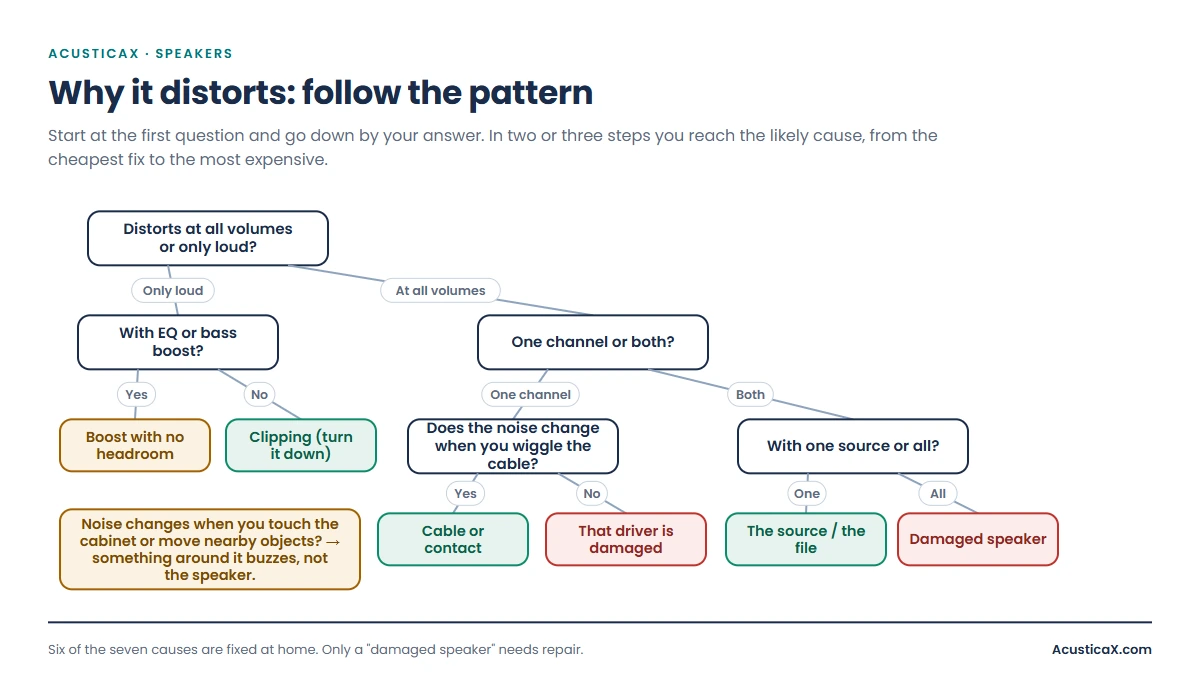
| What you notice | Points to… |
|---|---|
| Only distorts at high volume; clean when you turn it down | Clipping (you pushed it too loud) or a bass boost |
| Distorts at any volume, even low | Damaged speaker, or the source is already bad |
| Only in one channel (left or right) | Cable/contact on that side, or that driver is damaged |
| Only in the bass, with a rattle or buzz | Excursion at its limit, something loose, or the cabinet |
| Only with one song or app, fine with the rest | The source: a compressed file or a weak signal |
| Crackling that changes when you wiggle the cable | Loose cable or a dirty contact |
If you’d rather be asked one question at a time and handed a verdict, our guided speaker diagnosis by ear plays the test signals and rules out causes with you, no microphone and nothing to dismantle. It’s the interactive version of this same table.
The 7 reasons a speaker sounds distorted
1 · The volume is too high (clipping)
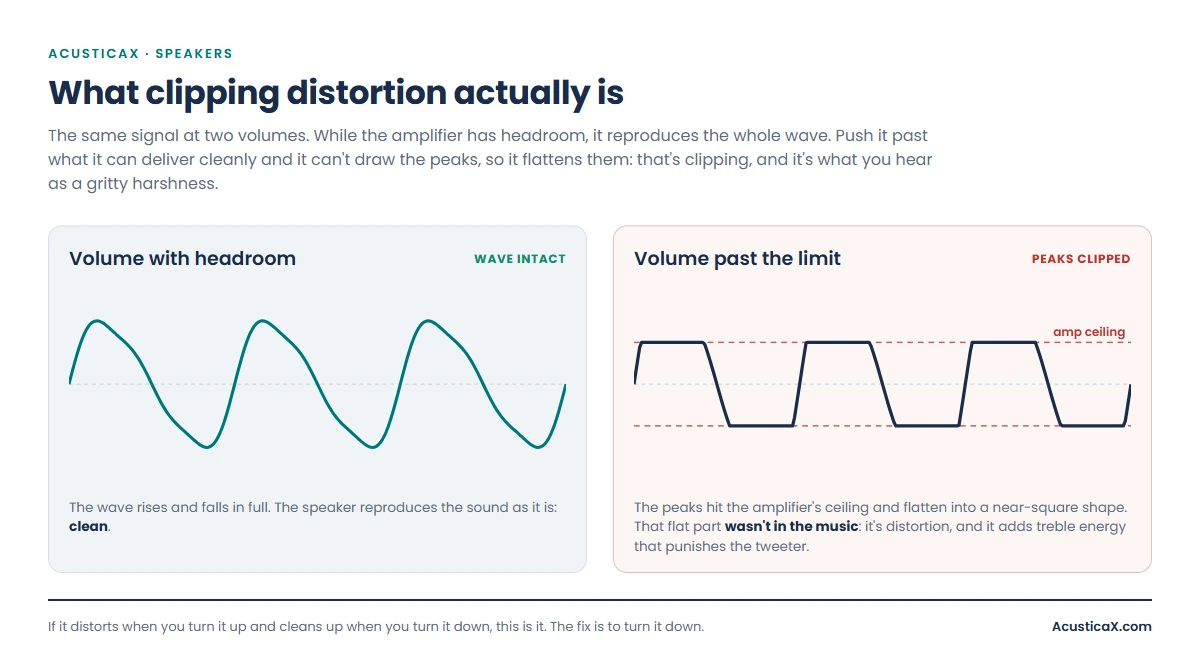
By far the most common cause, and the one most often mistaken for a blown speaker. When you push the volume past what the amplifier can deliver cleanly, it flattens the peaks of the waveform and, instead of a smooth curve, sends a near-square signal: that’s clipping, and it sounds like a gritty harshness that grows with the volume. The give-away: it only distorts loud; turn it down and it’s clean again.
Here’s a nuance almost nobody gets right. There’s a popular idea that “a speaker blows from too little power”; the reality is simpler and more honest: what damages a speaker is sustained power turned into heat, whether clean or clipped. Clipping matters for two reasons: the square wave adds high-frequency energy that lands on the tweeter – the smallest part and the one that tolerates the least heat – and because someone hearing distortion tends to turn it up more to compensate, exactly the wrong move. The practical rule is one line: if it distorts when you turn it up, turn it down. Not out of superstition, but because holding a speaker in clipping means holding it hot. And if it starts clipping before you reach your usual listening level, the amplifier is short of headroom for your speakers and your room; our guide on how many watts per channel you actually need shows how much you should have.
To know how far your speaker can go before it dirties up, this test of your speaker’s maximum clean level tells you at what volume it starts to distort, repeatably, instead of by feel.
2 · The source or the file is already distorted
A speaker only reproduces what reaches it, and sometimes what reaches it is already dirty. A low-quality MP3 (128 kbps or less), a sketchy video, a low-bitrate radio stream or a Bluetooth link with poor signal introduce a distortion no speaker can clean up. The key symptom: it distorts on a particular song or app while everything else sounds perfect, and it usually does so even at low volume.
The test is instant: play another track you know well, ideally from a service on good quality. If that one is clean, the speaker is healthy and the material was the problem. If you suspect your own music files, you can also check whether they are what they claim to be with the fake lossless detector, which reveals whether a supposed FLAC is really a re-encoded MP3.
3 · A loose cable or a dirty contact
Crackling, intermittent dropouts and sound that comes and goes are rarely the speaker’s fault: it’s almost always a cable. A half-seated connector, a frayed wire, a loose binding post or oxidised pins make irregular contact and dirty the signal. The confirming symptom: the noise changes, grows or vanishes when you wiggle the cable with sound playing, and it often affects a single channel.
Check that plugs are seated fully, swap the cable for one you know is good, and clean the contacts if they’re dirty. On gear with screw terminals, tighten them and make sure no stray strand touches the neighbouring one. It’s the cheapest fix on this whole list and it accounts for a huge share of “distorted speaker” cases.
4 · A bass boost or an EQ with no headroom
Raising bands on the equaliser or switching on a “bass boost” looks free, but it isn’t: every boost eats into your headroom, and the moment the boosted signal exceeds what the amplifier delivers cleanly, clipping begins. It’s a cause people inflict on themselves without realising. The symptom: it only distorts with the EQ or boost on, and worse on bass-heavy tracks.
The fix is counter-intuitive but foolproof: instead of raising the bass, lower everything else and turn the overall volume up. You get the same tonal balance without running out of headroom. It’s explained in full, with values by genre, in the guide on how to set your equaliser without wrecking the sound.
5 · The speaker is damaged (voice coil or cone)
This is the case everyone fears, and also the least common on the list. A physically damaged speaker – a rubbing or partly burnt voice coil, a cracked cone, a rubber surround rotted with age – distorts at any volume, even low, with a raspy, metallic sound, and often on just one driver. It’s the opposite signature to clipping: if it sounds bad even with the volume at minimum, suspect the driver itself.
There’s a classic physical check: with the gear off, press the cone gently and evenly with the pads of several fingers. If you feel or hear a rough scraping, the voice coil is rubbing inside the gap and the driver is gone. A healthy cone sinks smoothly and silently. Before writing anything off, go back to the guided diagnosis at the top and confirm it by ear – telling a damaged driver apart from a simple cable or source problem is exactly where most people get it wrong and bin a healthy speaker.
6 · Water, dust or debris in the cone
On phone, laptop and small Bluetooth speakers, a very common cause of distortion and muffled sound is plain dirt: dust, lint or water residue on the grille or over the diaphragm. The symptom: it started after getting wet or after a spell without cleaning, it sounds covered or with a slight rattle, and it affects one specific speaker on the device.
If water got in, don’t charge it and don’t bury it in rice: what works is to eject the water with sound, a tone at the speaker’s resonant frequency that pushes the droplets out. You have the tool for it, with a frequency slider and a dust mode, at eject water from your speaker. For dust, a soft dry brush over the grille; never poke objects in or blow hard into it.
7 · It isn’t the speaker: something around it is buzzing
The most underrated cause: often the speaker is perfectly fine and what’s rattling is something else. A loose cabinet screw, a badly seated grille, a resonating piece of furniture, an object on the shelf or the glass door of the cabinet vibrate with the bass and produce a buzz that sounds like distortion. The unmistakable symptom: the noise changes or disappears if you touch the cabinet, press the grille or move nearby objects away.
Placement makes it worse: a soundbar or speaker crammed into a closed cabinet cubby turns the furniture into a resonating box. There’s more on avoiding that in the guide on why your furniture ruins your soundbar’s sound. Before blaming the speaker, spend a minute tightening screws and clearing whatever sits near it.
How to confirm it with two at-home tests
Two checks separate almost any cause. The first is the tone test: play a tone that slowly sweeps up through every frequency and listen for where the distortion appears. If it only dirties in the bass, it’s excursion or something vibrating; if it’s across the whole range and at low volume, it’s physical damage. While you’re at it, you can send the sound to a single channel to see whether the problem is one driver or both. The tone and sweep generator does all of this, channel selector included.
The second is the silence-and-cone test: with a track you know, raise the volume gradually and note the exact level at which distortion starts (if it’s high, it was clipping); then, with the gear off, press the cone as described above to rule out a rubbing voice coil. Between the two, you’ll know whether you’re facing a setting, a cable, the source or a genuinely damaged speaker.
How to fix each case (and what’s fixable at home)
| Cause | What to do | At home? |
|---|---|---|
| Clipping from volume | Turn it down; if that’s not enough, a speaker or amp with more clean power | Yes |
| Bad source/file | Change the track or raise the streaming quality; replace the file | Yes |
| Cable or contact | Reseat, swap the cable, clean and tighten terminals | Yes |
| EQ with no headroom | Back off the boost; cut other bands instead of raising the bass | Yes |
| Water or dust | Eject the water with sound; dry-brush the grille | Yes |
| Something vibrating | Tighten screws, seat the grille, reposition the speaker | Yes |
| Damaged coil or cone | Recone/repair the driver or replace it; on phones, a repair shop | Rarely |
The smart order, so you don’t overspend: first turn it down and try another track (rules out clipping and source), then wiggle the cable and tighten whatever’s nearby (rules out cable and vibration), and only if it still distorts at every volume and with everything should you suspect the driver. Most people skip the first four steps and pronounce a speaker dead when it only needed a different cable.
When the speaker really is done for
A speaker is genuinely “blown” when the voice coil has burnt out (no sound, or just a hum) or when the cone or surround are torn and rub beyond repair. With the other six causes ruled out, if it distorts at any volume, with any source, on one channel, and you feel the scrape when you press the cone, it’s physical damage. On quality speakers, a workshop can recone it – replace cone and coil – for well under the price of a new one; on cheap, phone or small Bluetooth speakers it isn’t worth it and you replace it.
The point is not to get there: the number-one cause of burnt voice coils is holding a speaker in clipping for hours. Learn to recognise clipping distortion and turn it down the moment it appears, and a healthy speaker lasts decades.
Frequently asked questions
Why does my speaker sound distorted all of a sudden?
If it started suddenly, the likeliest cause is a cable that has worked loose or a dirty contact (crackling that changes when you move the cable), or that you’ve pushed the volume or bass boost past what the gear delivers cleanly. Rule those out before thinking of a blown speaker: play another track at moderate volume and wiggle the cable with sound playing.
How do I fix a distorted speaker?
In order: turn the volume down, try another good-quality track, wiggle and swap the cable, back off any bass boost, and tighten whatever rattles nearby. Six of the seven causes are fixed this way, for free. Only if it still distorts at any volume and with any source are you looking at a damaged speaker, which then needs repair or replacement.
What does a blown speaker sound like?
A damaged speaker sounds raspy, metallic or “broken” at any volume, even low, often on just one channel. If the distortion only appears when you turn it up and vanishes when you turn it down, it isn’t blown – it’s clipping. That’s the key difference: physical damage distorts always; clipping only when loud.
How do I know if a speaker is blown?
A speaker with a burnt voice coil produces no sound or only a faint hum despite being properly connected, and pressing the cone gently gives no normal springy resistance or you hear a scrape. With a multimeter, a burnt coil reads infinite resistance (open circuit). If it still makes sound but distorts at every volume, it’s damaged but not fully burnt out.
Does distortion come from too little power or too much?
It distorts from clipping when the amplifier runs out of clean power, yes, but what damages the speaker is sustained power turned into heat, clean or clipped. Clipping is dangerous because it tends to make you turn the volume up further and because it overloads the tweeter. The rule is simple: if it distorts when you turn it up, turn it down; don’t hold it in clipping.
My speaker only distorts on the bass – what is it?
Usually it’s excursion at its limit (the cone reaches the end of its travel on strong bass notes) or something vibrating with the bass: a loose screw, the grille, the furniture or a nearby object. Back off the bass boost and check whether the noise changes when you touch the cabinet or move objects away. If it persists only in the bass at moderate volume, check the cone surround.
Can a blown speaker be fixed?
It depends on the speaker. A quality one can be reconed at a workshop – they replace cone and coil – for well under the cost of a new one, and it comes out like factory. On cheap, phone or small Bluetooth speakers the repair isn’t worth it and you replace the part or the device. But before assuming it’s blown, rule out the other six causes: most “dead speakers” just had a loose cable.
In short: look at when it distorts before how it sounds, rule out from cheap to expensive (volume, source, cable, EQ, vibration) and leave “blown speaker” for last. If you’d like to be walked through it question by question to a verdict, the guided speaker diagnosis by ear does it with you in a couple of minutes, no microphone.