There is no single equalizer setting that works for everything. What does exist is three rules and a starting point per genre: move few bands, never go past ±3 dB, and cut before you boost. That alone will improve your sound more than copying any preset off the internet. And there’s something worth knowing before you touch a slider: if the problem is your room or your headphones, an equalizer won’t fix it – it will only paper over it.
Equalizing means turning a specific slice of the spectrum up or down, not the whole sound. Your equalizer – in Spotify, on your phone or on your amplifier – splits the audible range into a handful of bands and lets you shift each one a few decibels either way. The trick is knowing what lives in each band, because whatever is bothering you almost always sits in just one of them.
What each equalizer band actually controls
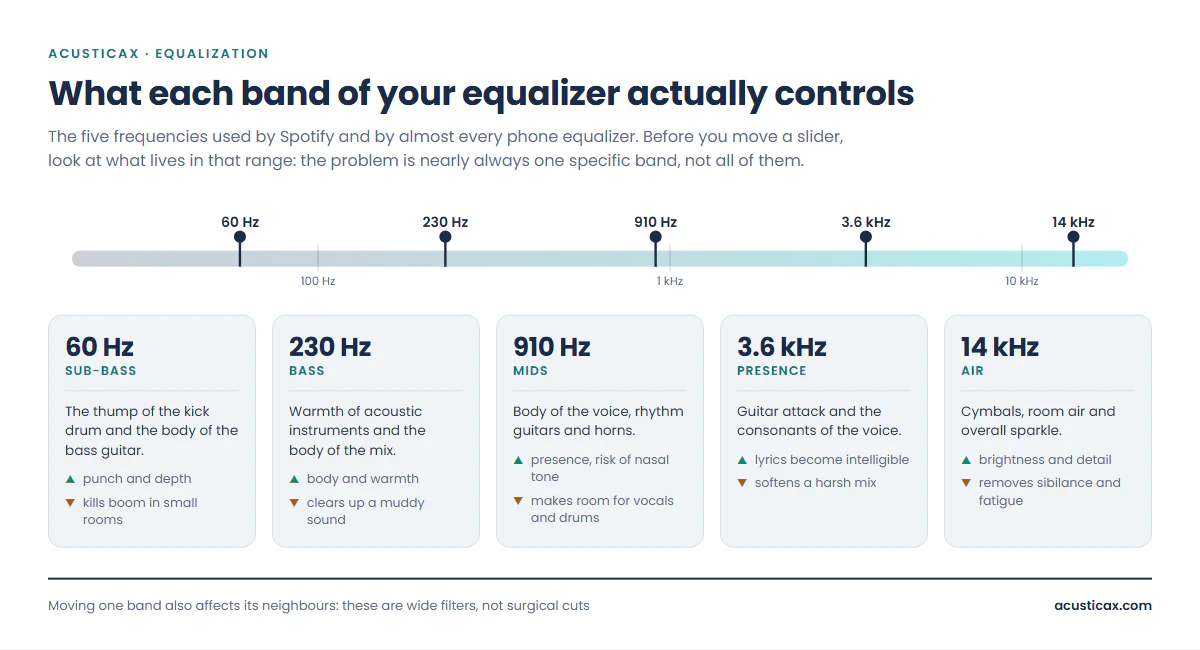
Spotify’s equalizer and most Android phones give you five bands: 60 Hz, 230 Hz, 910 Hz, 3.6 kHz and 14 kHz. Those numbers aren’t arbitrary – they’re spaced logarithmically, roughly two octaves apart, to cover everything audible with the fewest possible controls. Here’s what sits in each one.
| Band | What lives there | Boost it and you get | Cut it and you get |
|---|---|---|---|
| 60 Hz Sub-bass | The thump of the kick drum and the body of the bass guitar | Punch and depth | Less boom in small rooms |
| 230 Hz Bass | Warmth of acoustic instruments and the body of the mix | Body and warmth | A muddy sound cleans up |
| 910 Hz Mids | Body of the voice, rhythm guitars and horns | Presence, with a risk of nasal tone | Room for vocals and drums |
| 3.6 kHz Presence | Guitar attack and the consonants of the voice | Lyrics become intelligible | A harsh mix softens |
| 14 kHz Air | Cymbals, room air and overall sparkle | Brightness and detail | Less sibilance and fatigue |
One slider doesn’t affect only its own frequency
This surprises a lot of people, and it explains why sometimes “nothing happens” and other times far too much does. When you raise the 910 Hz slider you aren’t touching 910 Hz alone: you’re applying a wide bell that starts well below and tails off well above. That’s why three adjacent bands boosted is just a volume increase, not equalization, and why zig-zag settings — one up, the next down — don’t do what they look like they do: the bells overlap and cancel each other out.
Three rules worth more than any preset
1 · Cut before you boost
This is the rule that separates equalizing from fiddling, and it has a very concrete technical reason. A digital track is already mastered close to the maximum possible level, so boosting a band by +6 dB isn’t “adding” anything – you’re asking the player for more level than it can deliver. What comes out is digital clipping, which you hear as a harsh distortion on peaks, especially in the bass.
Studio equalizers solve this with a preamp control that drops the overall level to compensate. Spotify’s equalizer and the ones built into phones don’t have one. So if you want more bass relative to everything else, you have two options: boost the bass and risk clipping, or cut the mids and highs and then turn the volume up. The second sounds identical and never distorts. Try both on the same track and you’ll hear it.
2 · Don’t go past ±3 dB
A 3 dB adjustment is already clearly audible – it’s the equivalent of doubling the power in that part of the spectrum. Anything beyond that usually means the problem isn’t equalization at all: it’s speaker placement, the room, headphones that don’t suit you, or a badly mastered recording. If you need +8 dB of bass to make something sound right, the equalizer is the wrong tool.
3 · Tune with music you know by heart
Pick two or three tracks you’ve heard hundreds of times, ideally with a voice, an acoustic instrument and drums. Without a stable reference you can’t judge anything: your hearing adapts to any curve within seconds, and after two minutes “everything sounds fine”. One more thing that matters: set it at moderate volume. We perceive less bass and less treble at low levels, so whatever you dial in at 3 a.m. in silence will sound overcooked the next day.
Equalizer settings by genre, in decibels
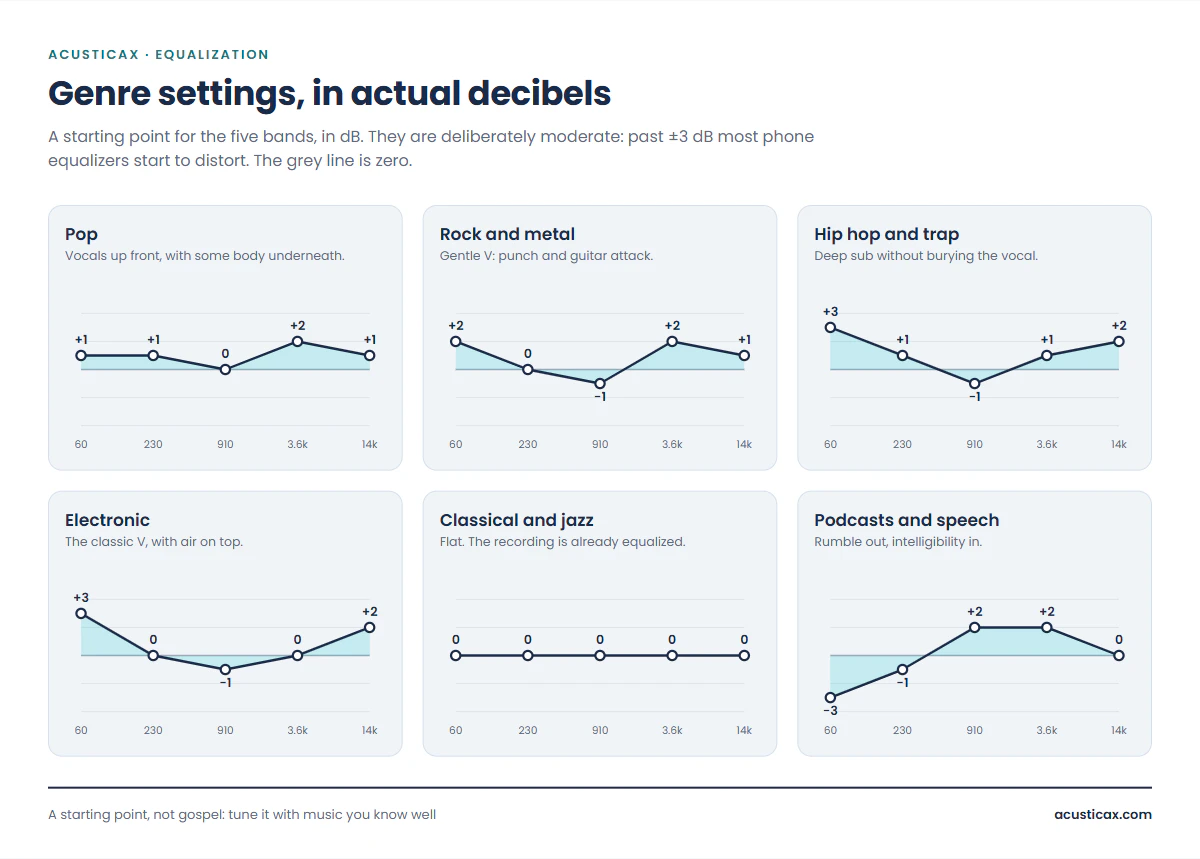
These are starting points for the five bands, not absolute truths. They’re deliberately restrained – none goes past ±3 dB – because a modest setting that never distorts always beats a dramatic one that clips.
| Genre | 60 Hz | 230 Hz | 910 Hz | 3.6 kHz | 14 kHz |
|---|---|---|---|---|---|
| Pop | +1 | +1 | 0 | +2 | +1 |
| Rock and metal | +2 | 0 | −1 | +2 | +1 |
| Hip hop and trap | +3 | +1 | −1 | +1 | +2 |
| Electronic | +3 | 0 | −1 | 0 | +2 |
| Classical and jazz | 0 | 0 | 0 | 0 | 0 |
| Podcasts and speech | −3 | −1 | +2 | +2 | 0 |
Pop
Pop is produced with the vocal front and centre and already arrives heavily compressed, so it needs very little help. A modest lift at 3.6 kHz makes consonants land without having to turn the volume up, and a touch of 60 and 230 Hz gives the bass some body without muddying it. Leave 910 Hz alone: that’s where the body of the voice sits, and any excess there sounds like a phone call.
Rock and metal
A gentle V works here: some punch at the bottom for kick and bass, a slight cut at 910 Hz to clear the pile-up where rhythm guitar and vocals fight each other, and a lift at 3.6 kHz that brings back pick attack and cymbal edge. Be careful up top: on heavily compressed modern metal recordings, boosting 14 kHz turns the cymbals into constant hiss and gets tiring within ten minutes.
Hip hop and trap
This is the genre where bass matters most, and also the easiest one to ruin. The trick is to boost 60 Hz – the sub, where the 808 lives – and go easy on 230 Hz, because that’s where bass turns woolly and swallows the vocal. A small cut at 910 Hz opens up space for the rap, and a lift at 14 kHz puts the snap back into the hi-hats. If your speaker is small, boosting 60 Hz will do nothing useful: it can’t reproduce that frequency, so all you’ll get is distortion.
Electronic
The classic V, and here it’s genuinely justified: electronic music is produced with club systems in mind, which means plenty of sub and plenty of sparkle. Boost 60 Hz and 14 kHz, cut 910 Hz slightly and leave the rest flat. It’s the one genre where a pronounced setting doesn’t sound forced, because the production itself was built for it.
Classical, jazz and acoustic
Everything at zero, and that isn’t laziness. These are the least compressed and least processed recordings there are, and many are captured with just a few microphones in a real hall: what you hear is the balance between the instruments and the acoustics of the room, exactly as the engineer decided it. A V-shape destroys precisely that, because it scoops out the mids – which is where strings, horns and voices live. At most, a single point of 14 kHz adds a little air to violins on modest headphones. Nothing more.
Podcasts, audiobooks and speech
This is the setting people appreciate most and almost nobody uses. Spoken voice has nothing useful below 100 Hz: down there you’ll only find handling noise, air conditioning and the rumble of whatever room it was recorded in. Cut 60 Hz hard, trim 230 Hz a little and lift 910 Hz and 3.6 kHz, which is where intelligibility lives. A badly recorded podcast becomes listenable with this, and in a car or on the train the difference is enormous.
The V-shape: why it hooks you and when it ruins the music
The V-shape – bass and treble up, mids down – is also called the “smiley” or “bathtub” curve, and it is by a distance the most used setting in the world. It hooks people for a real psychoacoustic reason: the extremes of the spectrum are the first thing our hearing registers as “quality”, so a V makes anything sound more impressive for the first thirty seconds.
The trouble shows up after that. The mids a V scoops out are where nearly all the music lives: the voice, the guitar, the piano, the horns, the snare. That’s why an exaggerated V produces the “sounds spectacular but I can’t follow the lyrics” effect, and why it’s fatiguing: your hearing has to work harder to rebuild what’s missing in the middle. It’s an excellent setting for a party and a poor one for listening to an album.
Practical rule: if you’re going to use a V, make it asymmetric and gentle. Cutting the mids slightly almost always works better than boosting the extremes heavily – not least because it doesn’t eat your headroom before clipping.
An equalizer won’t fix your room or your headphones
This is the part no preset guide tells you, and it’s the one that will change your sound the most. Most of the problems people try to correct with an equalizer aren’t equalization problems at all. They come from the room, from where the speakers sit, or from headphones whose curve doesn’t suit you.
How to tell a room problem from an EQ problem
There’s one signal that never fails: if the boom only shows up on certain bass notes and not others, it’s the room, not the recording. That’s room modes – standing waves that form between parallel walls and reinforce specific frequencies by 10 or 15 dB depending on where you’re sitting. No five-band equalizer can fix that, because the problem is extremely narrow – it hits one note, not a whole octave – and it changes if you move half a metre.
Checking takes two minutes: put your room dimensions into the room mode calculator and see whether one lands on the note that booms. To watch it happen live, the real-time spectrum analyzer using your phone’s microphone shows you exactly which frequencies spike at your listening position. Once you see the peak on screen, it clicks why the equalizer wasn’t fixing it. And if the room does turn out to be the culprit, our guide on how to improve the acoustics of your listening room covers what actually works.
What an equalizer genuinely can fix
It isn’t all bad news – there are three jobs an equalizer is exactly the right tool for.
- Compensating for headphones. Every model has its own frequency response, and many ship with a built-in bass lift. The equalizer works beautifully here because the deviation is broad and consistent. You can see how far yours stray in the headphone frequency response comparison tool.
- Rescuing a mediocre recording. A dull old album or a bass-heavy podcast can be sorted out with two moves.
- Adapting to where you are. On the train or walking down the street, ambient noise masks bass and speech; a different curve for those situations makes complete sense.
Find your own setting in five minutes
Instead of copying a preset, here’s a quick method to find out what your system needs. You’ll want the tone and noise generator and five quiet minutes.
- Play pink noise at a moderate level. It sounds like a waterfall and carries equal energy per octave, so it should sound even, with no region jumping out.
- Listen for what sticks out. Booming? Too much bass. Hissy or piercing? Too much treble. Like it’s coming through a blanket? You’re short on upper mids.
- Correct that region and only that one, with 2 or 3 dB on the matching band from the table above.
- Switch to a bass sweep from 20 to 200 Hz and listen for regions that leap out or vanish. If one particular note is far louder than its neighbours, that’s the room and no equalizer will touch it.
- Go back to your reference music and compare with the equalizer on and off. If turning it off makes you miss the setting, you got it right; if you notice nothing, drop it.
This method has one advantage over any preset: it gives you a setting for your gear in your space, which is the only thing that matters. A preset from the internet was built for somebody else’s system.
Where to find the equalizer in each app
| App | Where it lives | Bands |
|---|---|---|
| Spotify (Android) | Settings → Playback → Equalizer | 5 |
| Spotify (iPhone) | Settings → Playback → Equalizer (presets) | Presets |
| Apple Music | iOS Settings → Music → EQ | Presets |
| YouTube Music | Opens the Android system equalizer | Depends on phone |
| Android | Settings → Sound → Sound effects | 5–10 |
| Windows | Control Panel → Sound → Properties → Enhancements | 10 |
A note on genre-named presets: they’re convenient, but they’re built blind and tend to be far more aggressive than anything in the table above. If your app only offers presets, pick the one that bothers you least and move on – the real difference will come from your headphones and your room, not from the preset.
Frequently asked questions
What are the best equalizer settings?
Whichever ones correct what’s wrong with your specific system – which is why no two people share the same answer. If you have to pick blind, flat is the safest: it respects the original mix. From there, move only the band that bothers you, and by no more than 3 dB.
Is flat EQ the same as EQ off?
Sonically, yes: an equalizer with every band at zero changes nothing. The only difference is that some players add a little latency or use slightly more battery with processing active. If you’re not going to move a band, switch it off.
Why does boosting the bass make it sound worse?
Two reasons, usually at once. The first is clipping: boosting a band asks the player for more level than it can deliver, and distortion appears. The second is physical – if your speaker or headphones don’t reach that frequency, boosting it doesn’t create bass, it just drives the driver outside its range. Try cutting mids and treble and turning the volume up instead.
How do I set the equalizer for rock?
A gentle V: +2 dB at 60 Hz, −1 dB at 910 Hz, +2 dB at 3.6 kHz and +1 dB at 14 kHz. The mid cut clears the clash between rhythm guitar and vocals, and the 3.6 kHz lift brings back the attack. If your recordings sound sibilant, leave 14 kHz at zero.
Can an equalizer fix bad speakers?
Only up to a point. It can correct a mild imbalance – speakers that are a bit dull or a bit bright – but it can’t create frequencies the speaker doesn’t reproduce, fix distortion, or cancel room boom. Those need a different speaker or acoustic treatment.
How many bands do I actually need?
For listening to music, five are plenty. Ten give you finer resolution, and a parametric equalizer – where you choose the exact frequency and how wide the bell is – is the only kind that can fix narrow problems. But if you’re moving five sliders by ear, having twenty won’t improve the result.
Does an equalizer degrade audio quality?
The processing itself is transparent on any modern player. What does degrade the sound is overdoing it: boosting bands into clipping, or applying extreme curves that unbalance the mix. Used in moderation, an equalizer gives back considerably more than it takes.
To sum up: learn what lives in each band, move few of them and move them little, cut before you boost, and check whether what’s bothering you is really an equalization problem before trying to fix it with the equalizer. Do that and you’re already ahead of the 90 % of people dragging sliders at random.