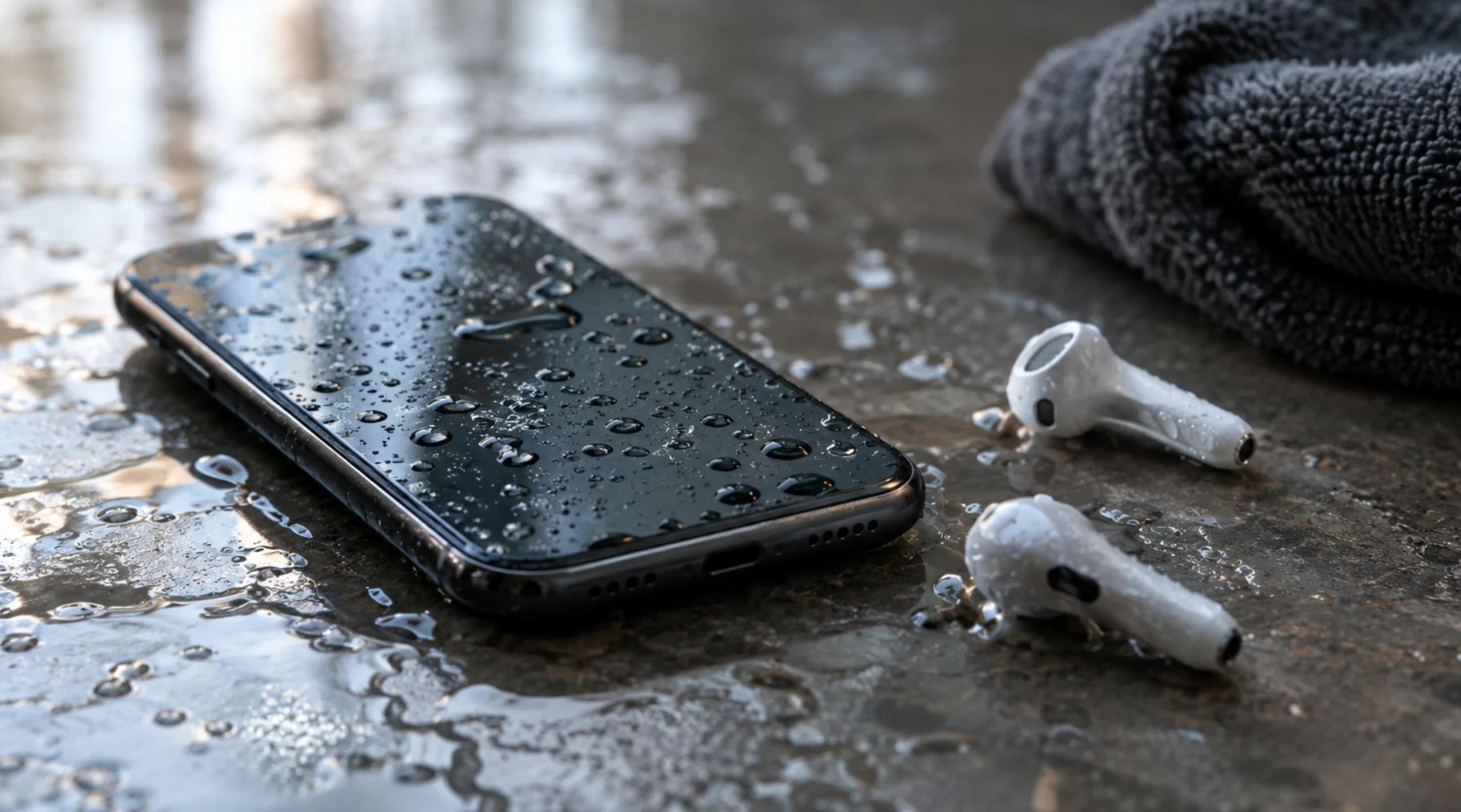
If you have a wet phone and it’s water-resistant (IP67 or IP68), wipe it dry, set it speaker-side down on a lint-free cloth and don’t plug in a charging cable for at least 5 hours, which is the window Apple gives (and no wireless charger until it’s dry). If it isn’t water-resistant and it went under, switch it off, don’t charge it at all and get it checked as soon as you can. Either way, skip the hair dryer, the compressed air, the cotton swabs and the bag of rice, and keep the SIM tray closed until it’s dry.
A muffled, quiet or underwater-sounding speaker is normal after a dunk. Water sits in the grille and the narrow channel the sound comes out of, and it damps the sound until it evaporates, which usually takes anywhere from a few minutes to a few hours. A loud low tone can help push it out, but only out of the speaker; it won’t dry the charging port, the microphone or anything inside. If the speaker still sounds wrong after 24 hours, it’s most likely no longer water but dried salt, sugar or soap, or damage.
What to do with a wet phone in the first five minutes
The priority is cutting any power the phone doesn’t need and getting water out of the openings before it works its way further in. In this order:
- Unplug the charging cable and any wired headphones.
- Switch it off if it isn’t water-resistant, if it went deeper or stayed under longer than its rating allows, or if it’s acting strangely.
- Take the case off. It traps water right over the speaker and the port.
- With seawater, pool water, soda or coffee, and only if the phone is water-resistant, rinse it under a gentle stream of tap water, never a high-pressure one.
- Wipe the outside with a lint-free cloth, such as a lens or microfiber cloth.
- Hold it with the port facing the floor and tap it gently against your palm to get the water out of the port. That’s Apple’s method; Samsung says to shake it gently.
- Leave it somewhere dry with a bit of airflow, speaker-side down on the cloth (on most phones that’s the bottom edge, where the port is too). Apple says a fan blowing cool air straight into the port speeds things up.
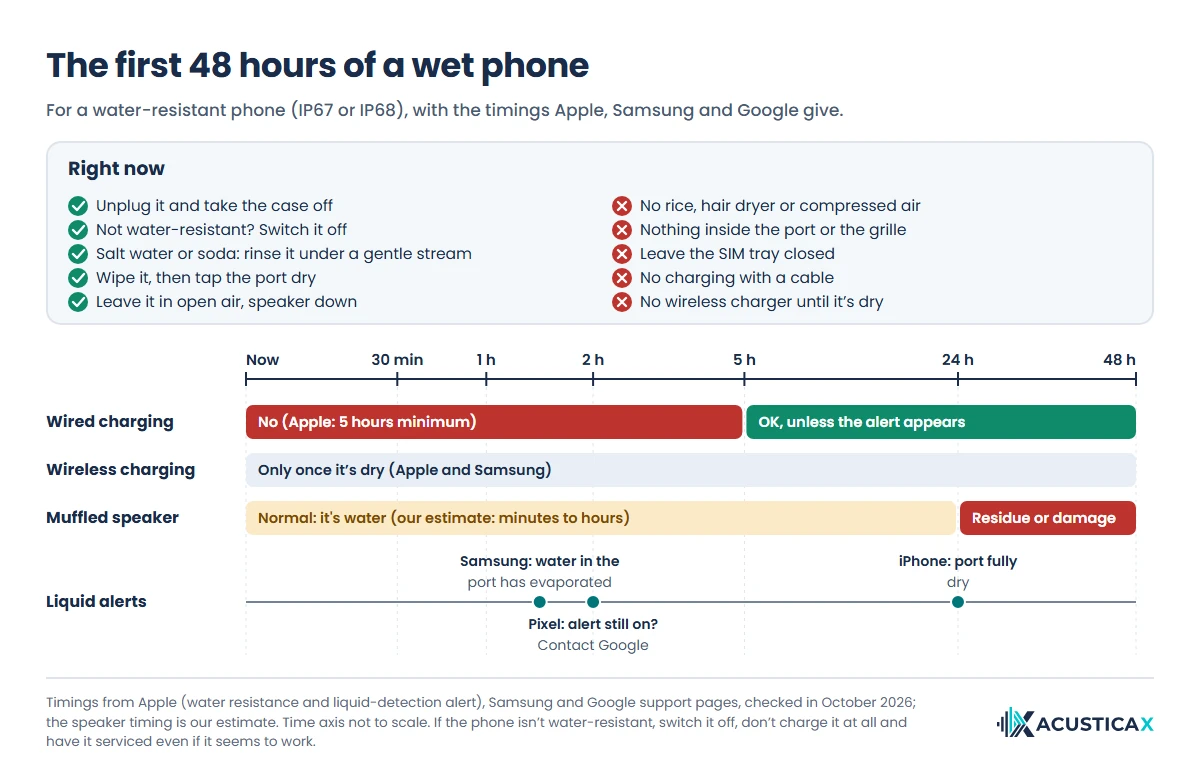
After that, it’s a matter of waiting without making things worse. Here are Apple’s, Samsung’s and Google’s timings for a water-resistant phone on one timeline:
Whether to turn it off depends on its water resistance
Turn it off when the phone isn’t water-resistant, when it went deeper or stayed under longer than its rating allows, or when it starts acting up (restarting on its own, a flickering screen). With water on the logic board, current is what causes short circuits and speeds up corrosion, and since almost no modern phone has a removable battery, switching it off is the best way to keep that current to a minimum.
For an IP67 or IP68 phone that just got splashed or took a quick dip in fresh water, Apple’s guide doesn’t tell you to power it down. Google does tell Pixel owners to turn the phone off when the USB port is wet and leave it on a flat surface at room temperature. When in doubt, switch it off. It costs you nothing.
To find out whether yours is water-resistant, look for an IP rating on its spec sheet. Every iPhone since the iPhone 7 has one, as do plenty of midrange and flagship Android phones. If you can’t find a rating anywhere, treat it as if it had none.
Rinse off salt water, pool water or soda if the phone is water-resistant
Rinse it with tap water, as long as it’s water-resistant. Apple’s guide to iPhone water resistance puts it plainly (“If a liquid other than water splashes on your iPhone, rinse the affected area with tap water”), and Samsung’s page on moisture in the charging port gives the same advice with fresh water. Salt, chlorine and sugar stay behind when the water dries, clogging the speaker grille and corroding the contacts in the port. Keep the stream gentle, since Apple specifically warns against pressurized water.
Don’t hold a phone that isn’t water-resistant under the tap. Dry it, switch it off and get it to a repair shop as soon as you can, because salt keeps eating away at the board even after the outside looks dry.
What never to do, and who says so
Don’t charge it while it’s wet, don’t heat it, don’t poke anything into its openings, don’t bury it in rice and don’t open the SIM tray until it’s dry. Almost all of these rules come from manufacturers’ support pages; the one about the tone comes from our own tool’s warning.
| Don’t | Why | Who says so |
|---|---|---|
| Charge it with a cable while it’s wet (Apple says wait 5 hours) | With water in the port, charging corrodes the pins, and the damage can be permanent | Apple, Samsung and Google |
| Put it on a wireless charger before it’s dry | If water got inside, the board still gets power | Apple and Samsung both say to dry it first |
| Put it in rice | It dries more slowly than open air, and rice particles can end up inside | Apple, and Gazelle’s 2014 test |
| Dry it with a hair dryer, on a radiator, in the oven or in direct sun | Heat softens the adhesive that seals the screen (repair shops use heat to lift it) and stresses the battery. Apple rates the iPhone for use at 32 to 95 °F (0 to 35 °C) | Apple |
| Blast it with compressed air | It can drive water deeper inside | Apple |
| Push cotton swabs, paper towels, toothpicks or pins into the port or grille | They can tear the speaker mesh, bend the contacts and leave fibers behind | Apple, Samsung and Google |
| Open the SIM tray while it’s wet | The tray has a gasket that’s part of the seal. Open it and water gets in | Apple |
| Play a water-eject tone with earbuds in | The tone is meant to play at full volume through the speaker, not in your ears | Our tool’s own warning |
Putting your phone in rice dries it more slowly than open air
No. Putting your phone in rice doesn’t help, and Apple says so in writing on its liquid-detection alert page: “Don’t put your iPhone in a bag of rice. Doing so could allow small particles of rice to damage your iPhone.” The test everyone cites was run in 2014 by Gazelle, a US company that buys and resells used phones, which compared seven household materials to see which pulled the most water out of a wet sponge in 24 hours. Plain uncooked rice came last, behind silica gel, cat litter, couscous, two kinds of oatmeal and instant rice, and the sponge left in open air dried better than any of them.
Rice only seems to work because the phone sits in the bowl for the hours it needed to dry anyway. Silica gel absorbs more than rice, but you need a lot of it (Gazelle suggested at least four cups in a container of one to two quarts), and even then Gazelle concluded that leaving the phone in open air, ideally with a fan, “works just as well.” If you use it, use it for the last traces of moisture, never instead of draining the water out.
How long to wait before charging, and why
Wait at least 5 hours before plugging in a cable. That’s Apple’s figure for an iPhone that’s been wet: “Allow at least 5 hours before charging with a Lightning or USB-C cable or connecting an accessory.” Charge it with a wet port and, in Apple’s words, “the pins on the connector or cable can corrode.” iPhones from the XS on, water-resistant Galaxy phones and Pixels won’t even let you, because they detect the liquid and shut off wired charging (the alerts are covered further down).
A wireless charger skips the port, but it isn’t a shortcut either. Apple says to make sure the iPhone is dry before you put it on the pad, and Samsung says to dry the phone thoroughly first. If all you’ve got is the port alert on a water-resistant phone, Apple lets you charge wirelessly once the back is dry. If the phone went under, and especially if it isn’t water-resistant, don’t charge it any way at all until it’s completely dry.
Phone speaker muffled after water? Here’s why, and when it clears
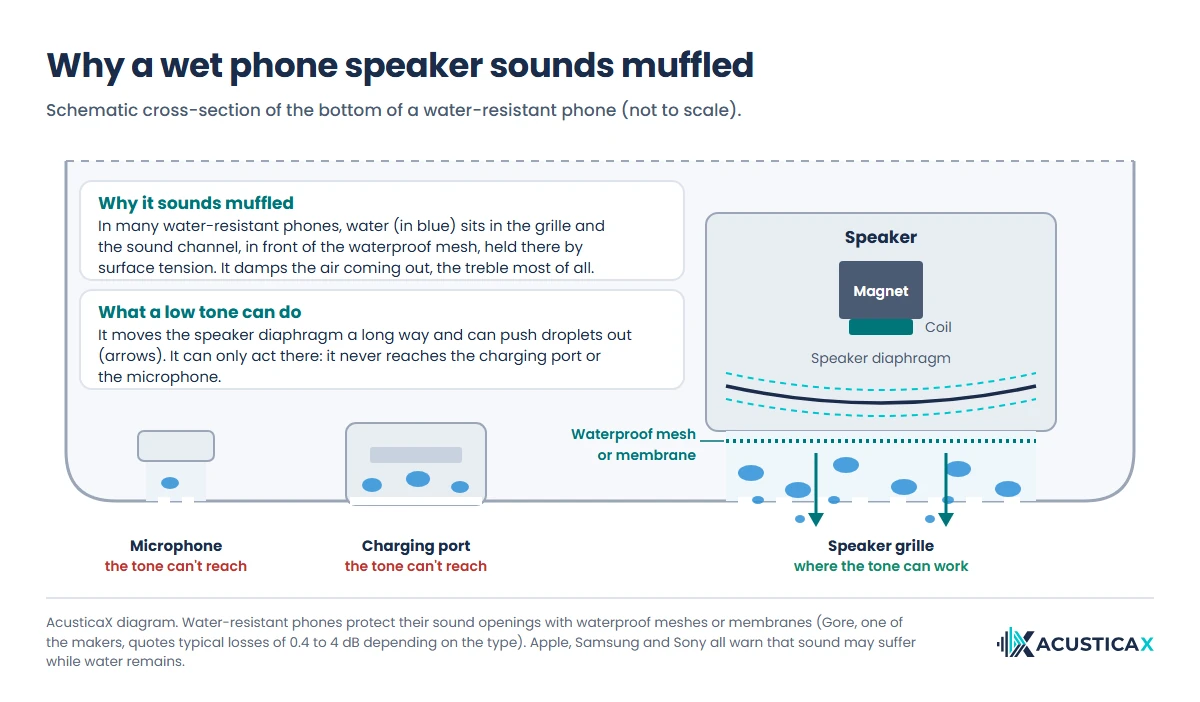
It sounds muffled because water is blocking the way out. A phone speaker pushes air through a narrow channel that ends at the grille, and water-resistant phones protect their sound openings with waterproof meshes or membranes that let sound through. Gore, one of the companies that makes them, quotes typical losses of 0.4 to 1.4 dB for its shallow-immersion vents and 2.9 to under 4 dB for the deep-immersion ones it makes for smartphones. In many water-resistant phones, the water stays in front of the speaker, in the grille and the channel, held there by surface tension, and damps the sound, the treble most of all. That’s why the speaker sounds dull, quiet or like it’s underwater.
Manufacturers treat it as temporary. Apple warns that water in the port can degrade speaker or microphone performance until it evaporates completely, and suggests laying the phone “speaker side down, on a lint-free cloth” to see if water drips out. Samsung’s Galaxy water-resistance page says that if the microphone, speaker or receiver isn’t completely dry, call and audio quality may suffer. And Sony’s help guide for its waterproof speakers says outright that sound quality may change when water gets into the speaker and that this isn’t a fault.
It usually improves within minutes and clears completely within a few hours. That’s our estimate, because manufacturers don’t give a timeline for the speaker; the ones they do give are for the port, about 1 to 2 hours according to Samsung and up to 24 according to Apple.
Can a sound really push the water out?
It can help the speaker, and nothing else. A loud low-frequency tone makes the speaker diaphragm move a long way, which can push droplets back out through the grille. Apple builds this into the Apple Watch. According to its guide to Water Lock on Apple Watch, when you turn it off, “a series of tones plays to clear any water that remains in the speaker.”
We couldn’t find a single phone maker’s support page that documents the same trick for phones, or any independent measurement of how much it speeds up drying. The physics is the same, with one hard limit. The tone only moves air through the speaker, so it does nothing for the charging port, the microphone (which picks up sound rather than producing it) or the inside of the phone.
To try it, you can eject water from your phone speaker with our free tool, which lets you slide the frequency to whatever makes your phone buzz hardest instead of playing a fixed 165 Hz file. Take your earbuds out, remove the case, turn the volume all the way up and point the speaker at the floor. On phones with stereo speakers, the second speaker is usually the earpiece, so the tone comes out of the top as well (cover it with a finger while it plays and you’ll hear the difference).
When it’s your calls that sound bad
People can’t hear you properly? The water is in the microphone, and a tone won’t help there. Leave the phone to dry with its openings facing down; Apple and Samsung both say the microphone may underperform until the water evaporates. If it’s you who can’t hear the other person with the phone at your ear, the water is in the earpiece. It dries the same way, and on stereo phones the tone reaches it too.
When to charge again after a “Liquid Detected” alert
On an iPhone, try again after 30 minutes, and if the alert comes back, give it up to 24 hours; on a Samsung, water in the port evaporates in about 1 to 2 hours; on a Pixel, wait until you see “OK to use USB port.” Until then, the phone blocks wired charging.
Those 30 minutes don’t contradict the 5 hours above. Our reading of Apple’s two pages is that the 5 hours apply to an iPhone that’s been wet, and the 30 minutes to an alert that simply pops up when you plug in (a port damp from rain or sweat, say).
| Phone | What it says | How long to wait | Wireless charging? |
|---|---|---|---|
| iPhone XS, XR and later | “Charging not available,” “Liquid Detected in USB-C Connector,” “Liquid detected in Lightning Connector” or “Liquid Detected” | 30 minutes, then try again; up to 24 hours if it persists. If the iPhone got wet, 5 hours before using a cable | Yes, with the back dry, if only the port is wet |
| Samsung Galaxy (water-resistant models) | A moisture warning for the charging port, with an alarm that sounds as long as the cable stays plugged in | Water in the port evaporates in about 1 to 2 hours | Yes, once the phone is thoroughly dry |
| Google Pixel | “Liquid or debris in USB port” | Until it shows “OK to use USB port.” If it lasts 2 hours or more, contact Google | Google’s guide doesn’t say |
The alert won’t clear even though the phone is dry
Unplug the cable from the adapter and the adapter from the wall, then reconnect them, as Apple suggests. Try a different cable too, since a wet or damaged cable or accessory sets off the same alert. On a Pixel, Google suggests clearing a system cache (Settings, Apps, See all apps, More, Show system apps, then “USB Settings” or “Android System,” Storage & cache and Clear cache). Samsung’s support page doesn’t offer any way to switch the moisture warning off.
The iPhone’s emergency override, which lets you charge despite the alert, is there for real emergencies, and Apple advises against using it while the phone is wet. If the alert keeps coming back with a dry port, there may be lint or corrosion on the pins. Don’t dig at it; take it in for service.
What IP67 and IP68 really mean
IP67 and IP68 are ratings under the IEC 60529 standard, measured in a lab with fresh water. The second digit is the water part. A 7 means 30 minutes at a depth of 1 meter (about 3 feet), and an 8 means whatever the manufacturer specifies beyond that. Here’s what Apple and Samsung claim:
| Phone | Rating | Depth and time |
|---|---|---|
| Every iPhone 12 through 17 model, plus the 16e, 17e, Air, 18 Pro models and Duo | IP68 | 6 m (about 20 ft) for 30 minutes |
| iPhone 11 Pro and 11 Pro Max | IP68 | 4 m (about 13 ft) for 30 minutes |
| iPhone 11, XS and XS Max | IP68 | 2 m (about 6.5 ft) for 30 minutes |
| iPhone 7, 8, X, XR and SE (2nd and 3rd generation) | IP67 | 1 m (about 3 ft) for 30 minutes |
| Samsung Galaxy phones rated IP68 | IP68 | 1.5 m (about 5 ft) for 30 minutes |
What the label doesn’t tell you is that the protection wears out. Apple and Samsung both say water resistance decreases with normal use, so a four-year-old phone, or one that’s had its screen replaced, may not hold up the way it did new.
It isn’t for every kind of water, either. Samsung tells you to keep Galaxy phones away from salt water, pool water, soapy water, oils, perfume, sunscreen, hand sanitizer and anything containing alcohol, and Apple advises against swimming or showering with an iPhone, spraying it with pressurized water or using it in a sauna.
In Australia, Samsung paid for advertising Galaxy phones in pools and the sea. In 2022, the Federal Court ordered it to pay A$14 million in a case brought by the consumer watchdog, the ACCC, over nine such ads. Samsung acknowledged that after being submerged in pool or sea water there was “a material prospect the charging port would become corroded and stop working if the phone was charged while still wet.” The ACCC said it had reviewed hundreds of complaints, many from people whose phones stopped working entirely.
And water damage isn’t covered by the warranty. Apple is blunt about it (“Liquid damage is not covered under warranty”), though it adds that you might have rights under consumer law.
The speaker still sounds off after 24 hours
After 24 hours, the water in the grille should have evaporated, so whatever you’re hearing most likely has another cause. Either something dried in the mesh (salt, sugar, soap or pocket lint) or the diaphragm or voice coil is damaged, and the kind of noise points you in the right direction.
| What you hear | Likely cause | What to do |
|---|---|---|
| Still muffled or quiet, same as day one | Residue dried in the mesh (salt, chlorine, sugar, soap) or lint | If it’s water-resistant, rinse the area under a gentle stream of tap water and dry it again. Then brush the grille with a soft, dry brush. For lint, you can try the tool’s dust mode |
| Crackling, buzzing or rattling in the bass | A damaged diaphragm or voice coil, or something loose in the grille | Run the guided diagnosis below. If it points to the speaker, get it serviced |
| No sound from the speaker, but fine through headphones | Audio is going somewhere else (a connected Bluetooth device), a software glitch or a faulty speaker | Turn Bluetooth off, restart and try another app. If it still won’t play, get it serviced |
| Only calls sound bad | Residue or damage in the microphone or the earpiece | The voice memo test below tells you whether it’s the microphone. If it doesn’t improve, get it serviced |
| Marks on the screen, a fogged camera, or it won’t charge | Water has reached the inside | Turn it off and take it in for service right away |
To tell a damaged speaker from a dirty one, our guided speaker diagnosis plays bass and treble sweeps and asks you what you hear. A rub or buzz that always shows up in the same part of the sweep points to the diaphragm. If what you’re hearing is closer to distortion, our guide on why a speaker sounds distorted explains how to tell its seven causes apart.
A two-minute test for speaker, microphone or software
Record a voice memo and play it back twice, once through the speaker and once through headphones. Fine in headphones but bad through the speaker means it’s the speaker. Bad both ways means the microphone recorded it badly, so that’s the part still wet or damaged. And if nothing comes out of the speaker in any app while headphones work fine, restart the phone before you assume it’s broken.
On a phone with two speakers, play some music and cover each one with a finger in turn. Covering the good one drops the volume a lot; covering the waterlogged one barely changes anything.
Wet Bluetooth speakers
Dry the outside and set it speaker-side down on a cloth, which is what Sony’s help guide for its waterproof speakers recommends. Sony adds one more step. Once it’s drained, stand it upright and pat the bottom about 20 times with a dry cloth to get the water out from inside. It also notes that the sound may change while water is still in there, which isn’t a fault, and that in cold weather leftover moisture can freeze and damage the speaker.
Don’t charge it until the port is dry. JBL’s quick start guide for the Flip 6 says not to expose it to water while charging, and the speaker beeps to tell you to unplug if its USB-C port detects water, salt or other chemicals. JBL also warns that pool chemicals and salt can damage the seals and the connector over time if they aren’t rinsed off after use, and Sony suggests rinsing a very dirty speaker lightly with tap water. Our tone tool also has starting points for small and large Bluetooth speakers.
Frequently asked questions
How long does it take for a phone to fully dry out?
The outside and the speaker take minutes to a few hours (that’s our estimate). The port takes longest. Samsung says about 1 to 2 hours, and Apple allows up to 24, with a minimum of 5 before you use a cable. If the phone isn’t water-resistant and went under, don’t wait for it to dry on its own. Switch it off and get it checked as soon as you can, because you can’t see water inside and corrosion starts right away.
Does the rice method actually work for phones?
No. Rice dries a phone more slowly than open air (it came last of seven materials in Gazelle’s test), and Apple tells iPhone owners not to use it because rice particles can damage the phone. Leave it out in a dry spot with some airflow instead.
My phone got wet but still works. Am I in the clear?
If it’s water-resistant, it was fresh water and it stayed within its rating, it’s usually fine. Dry it well and wait 5 hours before charging it with a cable. If it isn’t, or it was salt water, working today proves nothing, because corrosion keeps going for days. In Gazelle’s test, all four iPhones (none of them water-resistant) came out of the water still running, and three wouldn’t turn on after a weekend of drying; a new battery brought one back fully and another only partly.
Does water permanently damage a phone speaker?
Rarely, if it was fresh water and the phone is water-resistant, because in many models the water stays in front of the mesh that protects the speaker. What does the damage is whatever dirty water leaves behind. Salt, chlorine and sugar dry in the mesh and clog it, which is why it’s worth rinsing a water-resistant phone with tap water rather than letting it dry as is.
How long does it take for water to dry in a phone speaker?
Usually a few minutes to a few hours, by our estimate. Set the phone speaker-side down on a lint-free cloth, as Apple recommends, and you can try a loud low tone with your earbuds out. If it still sounds muffled after 24 hours, check the symptom table above.
Can I bypass moisture detected?
On an iPhone, yes. Reconnect the cable and you’ll get an emergency override option, but Apple advises against charging while the port is wet. Samsung and Google don’t document any override; their advice is to let the port dry, and Samsung points you to wireless charging in the meantime, once the phone is dry. If the warning sticks around with a dry port, the cable, lint or corrosion is the likely culprit.
What happens if my phone gets a little wet?
If it’s water-resistant, usually nothing. A splash is well within an IP67 or IP68 rating. Wipe it dry, give the speaker a few minutes if it sounds muffled, and hold off on charging until the port is dry. A phone without a rating is a different story, since even a little water can reach the board, so dry it and switch it off.
How much does it cost to fix a water-damaged phone?
It depends on what the water got to, and the warranty almost never covers it. Apple excludes liquid damage, which is standard practice across brands, so check yours. For reference, Apple’s US estimate for “other damage” out of warranty is $529 for an iPhone 17e, $679 for an iPhone 17 and $849 for an iPhone 17 Pro, and with AppleCare+ that damage costs $99 (Apple’s website, October 2026). Get a quote before you approve the repair, because once water has reached the logic board, replacing the phone can make more sense.