The short answer: lossless audio is worth it only if your whole playback chain preserves it, and for most people listening over Bluetooth it never gets that far. The lossless file isn’t the problem – it’s that between the file and your ears sits a chain: the wireless codec, the DAC, the headphones, the room, and your own hearing. One weak link and the advantage is gone before you hear a note. Since September 2025, with Spotify handing FLAC to every Premium subscriber at no extra cost, the question has shifted from “should I pay for this?” to “does this toggle actually change anything for me?”
This guide gets straight to the data: what lossless audio actually is and how it differs from hi-res, whether you can really tell it from a good MP3, which link in your gear eats the difference, what quality each streaming service truly delivers, how to spot a fake FLAC in thirty seconds, and how to run your own blind test so you don’t have to take anyone’s word for it – including ours.
What lossless audio actually is (and what it isn’t)
“Lossless” means that when you decompress the file, you get the original recording back bit for bit, with nothing thrown away. It does not mean “uncompressed”: a FLAC compresses much like a ZIP compresses a document, roughly halving the size, but what comes out is exactly what went in. An MP3, by contrast, is “lossy”: to take up five times less space, a psychoacoustic model decides which parts of the sound your ears probably won’t miss and deletes them permanently. That information never comes back, no matter how you re-encode the MP3 to FLAC afterwards.
A third term gets mixed in constantly and is worth separating out: hi-res. It all makes more sense in a table.
| Type | Examples | What it does to the original | Typical size per track |
|---|---|---|---|
| Lossy | MP3, AAC, Ogg Vorbis | Permanently deletes information to save space | 3-10 MB |
| Lossless (CD quality) | FLAC, ALAC, WAV at 16-bit/44.1 kHz | Returns the recording bit for bit; equal to a CD | 25-40 MB |
| Hi-res | FLAC, ALAC at 24-bit/96 or 192 kHz | Lossless and with more bits and samples than a CD | 50-150 MB |
Lossless is not the same as hi-res
This is the most common mix-up, and the platforms don’t help clear it up. Lossless means “identical to the CD master”; hi-res means “with more data than a CD.” The first is a fidelity guarantee almost any pair of ears can benefit from on the right gear. The second is up for debate: a CD’s 22 kHz ceiling already covers the limit of human hearing comfortably, so the audible benefit of climbing to 96 or 192 kHz is, honestly, highly arguable. If the jump to hi-res tempts you, the guide on whether hi-res audio is worth it lays out the myths and what the evidence actually supports.
Lossless is up against the good MP3
With a 320 kbps MP3 or a 256 kbps AAC, almost nobody can pick out the original in a blind test, because at those rates the format is already transparent. The difference shows up with a 128 kbps MP3, with very demanding music (cymbals, strings, very clean silences), and when the file is headed for more processing, since every new lossy conversion adds damage. For plain listening the gap is narrow; for archiving or editing it’s a chasm. We go through the full head-to-head in our guide to FLAC vs MP3 and when you can hear the difference.
The difference does show up, clearly, in other cases: with a 128 kbps MP3 (where the cut is obvious even on a phone), with demanding material – cymbals, strings, very clean silences, recordings with wide dynamic range – and above all when the file will be processed further, because every fresh lossy conversion stacks damage on top of the damage already there. For listening and nothing else, the gap between a 320 kbps and a FLAC is narrow; for archiving or editing, it’s a chasm.
What decides whether you hear it is the chain, not the file
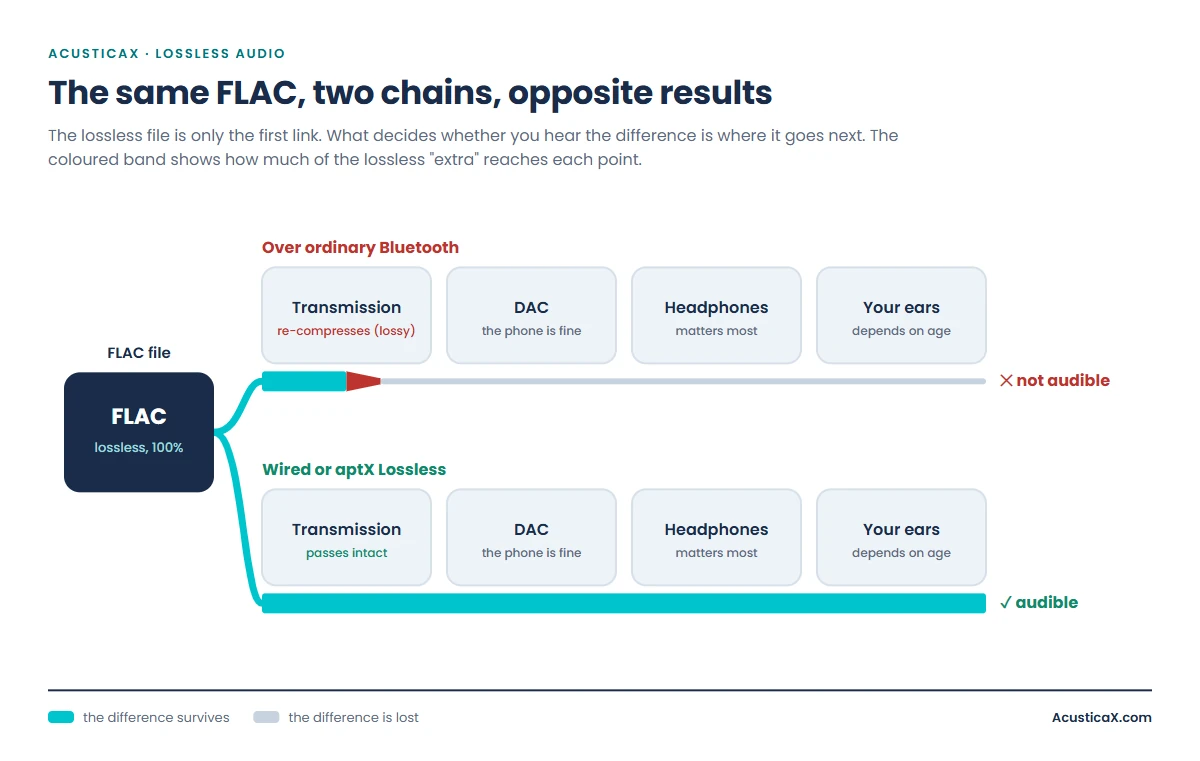
Here’s the idea almost no article explains, and it settles 90% of the doubts: the lossless file is only the first link. After it come the transmission system, the digital-to-analogue converter, the headphones or speakers, the room, and your hearing. If any of those links throws part of the information away, it doesn’t matter how perfect the source file was. And one link throws it away almost every time.
The Bluetooth bottleneck
This is the critical point and the one most people miss: Bluetooth re-compresses the audio with a lossy codec before sending it to your headphones. It makes no difference that the file is a perfect FLAC; the wireless codec re-encodes it to fit the link’s bandwidth. An uncompressed CD-quality signal needs 1,411 kbps, and hardly any Bluetooth codec comes close.
| Bluetooth codec | Maximum bitrate | Reaches CD quality (1,411 kbps)? |
|---|---|---|
| SBC (the universal default) | ~328 kbps | No, nowhere near |
| AAC (Apple’s music codec) | ~256 kbps | No |
| aptX | 352 kbps | No |
| aptX HD | 576 kbps | No |
| LDAC (Sony) | 990 kbps (drops to 660 or 330 with interference) | Gets close, but still lossy |
| aptX Lossless | Over 1,000 kbps | Yes, bit-for-bit CD quality (the exception) |
The practical takeaway is blunt: if you listen on ordinary Bluetooth headphones, turning lossless on changes nothing, because the link re-compresses it anyway. For that FLAC to reach your ears intact you need a wired connection, or the exact phone-and-headphones combination that supports aptX Lossless.
The DAC, the headphones and the room
Past Bluetooth, three more filters remain. The digital-to-analogue converter (DAC) turns bits into sound; the one in a modern phone is surprisingly good, so this is rarely where the problem lies, though a decent external DAC can make a difference with demanding headphones; before buying one, check whether your headphones actually need an amplifier or whether the phone output is enough. The headphones or speakers are, by a wide margin, the link that matters most: $20 earbuds won’t reveal the nuances a FLAC preserves, however cleanly the signal arrives. And the environment finishes the job: listening on the subway, in the car, or with background noise masks exactly the fine details – the reverb of a room, the air between instruments – that are the only thing separating lossless from a good MP3.
Your ears and your age
The last link is you. Human hearing reaches 20 kHz in theory, but that ceiling drops with age: from your forties on, many people don’t get past 14–16 kHz – and that high region is exactly where the subtlest differences between formats live. It’s no embarrassment, it’s physiology, but it’s worth knowing before paying for nuance your ears may no longer catch. Check it in two minutes with our hearing test that shows how high your ears still reach: if your ceiling sits at 15 kHz, much of the lossless debate simply stops applying to you.
The service matters less than your chain
Since Spotify added lossless in September 2025, almost every major platform offers it, and several charge nothing extra over the usual plan. What each one gives you, tier by tier and with its price, is in our music streaming quality comparison.
What matters here is something else. Qobuz or Tidal reaching 24/192 changes nothing if your Bluetooth link caps at 328 kbps. The resolution a service advertises is the theoretical ceiling, and what you hear is set by the weakest link in your chain. Before paying for the priciest tier, look at how the sound leaves your device.
Watch out for fake FLACs
A fake FLAC is a file with a .flac extension made from an MP3, so it takes up several times the space and sounds exactly like the MP3 it came from. Lossy compression usually leaves a flat cutoff in the treble that survives the conversion. A 128 kbps MP3 cuts off around 16 to 17 kHz and a 320 kbps one around 20 kHz, but a good VBR V0 file leaves almost no cutoff and can pass for genuine. And converting an MP3 to FLAC can’t bring the quality back, because what was thrown away is gone.
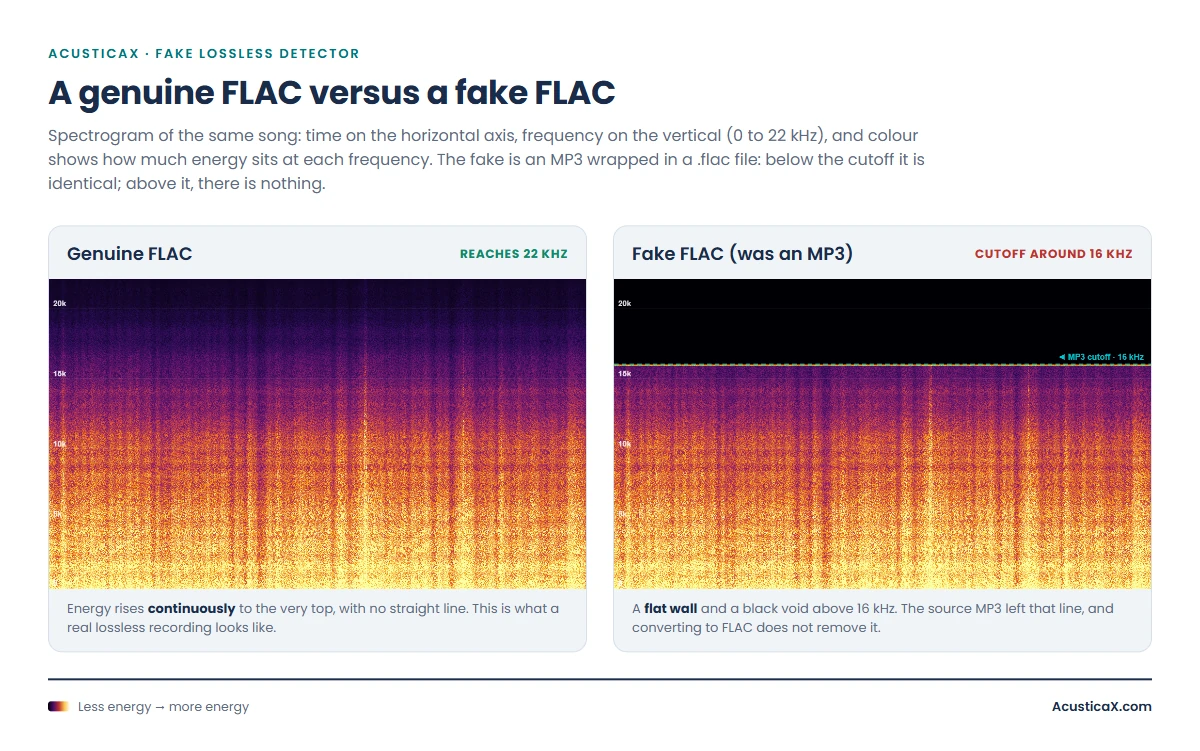
You don’t need to install anything to check. Drop the file into our fake lossless detector and in a few seconds it tells you how high the content reaches, without uploading it anywhere. The cutoff is a very reliable clue, not proof, because some old or gently mixed recordings never reach 20 kHz on their own.
How to run your own blind test (ABX)
Whether you can tell lossless from an MP3 on your gear isn’t a matter of opinion – it’s measurable. The method is called an ABX test: you hear sample A, then B, then an X that is one of the two at random, and your job is to say which. Repeat it several times and the statistics do the rest: get 8 out of 10 or 13 out of 16 right and the odds of it being luck drop below 5%, so you can claim you genuinely tell them apart. Score around half and you’re guessing – which is also a valuable answer, because it saves you money.
For the result to mean anything, set the listening up properly: use wired headphones (remember the Bluetooth bottleneck), level-match the two samples, kill the background noise, and turn the volume up loud but without distortion. You have two ways to do it: with your own files in our blind A/B/X listening test, which compares two files in the browser and computes the p-value for you, or with the classic NPR audio test, which pits an uncompressed recording against a 128 and a 320 kbps MP3. Almost everyone is surprised by their own score.
So who actually needs lossless audio?
It depends on what you use it for and what you listen with. These are the clear profiles.
| Worth it if you… | Not worth it if you… |
|---|---|
| Archive or collect music and want a master copy that survives future conversions | Listen mostly on ordinary Bluetooth headphones |
| Edit or produce audio, where every lossy conversion stacks damage | Usually listen out and about, commuting, or with background noise |
| Listen wired (or over aptX Lossless) on headphones or speakers that can keep up | Run entry-level gear that won’t reveal those nuances |
| Listen attentively, in quiet, and enjoy the fine detail of the mix | Play music in the background while doing other things |
And since lossless now ships included with most plans, the practical decision isn’t “do I pay more?” but “is the extra data and battery worth it?” If you listen over Bluetooth on the move, leave the toggle on “automatic” or off and lose nothing; if you sit down to listen wired, switch it on and enjoy it. And if you’d rather squeeze more out of what you already own without spending a cent, this guide on how to get the most from lossless with your current gear skips the marketing and goes to what actually changes the sound.
Frequently asked questions
Is lossless audio worth it?
It’s worth it if you listen wired on decent headphones or speakers and pay attention to the music. For anyone on Bluetooth, on the move, or with music in the background, the difference is practically inaudible, because the wireless link re-compresses the sound anyway. Since it’s usually included in the plan now, the question isn’t whether to pay but whether the extra data is worth it.
Is it better to have lossless audio on or off?
Turn it on when you listen wired or over Wi-Fi at home, where the quality arrives intact. Leave it on automatic or off when you use Bluetooth headphones or mobile data: you won’t hear the upgrade there, but you will feel the hit to data and battery. Many apps have an “automatic” mode that raises quality only on Wi-Fi, which is the sensible setting for most people.
How do I know if a FLAC file is genuine or fake?
Look at its spectrum with a spectrogram. A genuine FLAC reaches close to 22 kHz with no cutoff; a fake FLAC, made from an MP3, shows a flat wall and a void above 16 or 20 kHz – the fingerprint of the source MP3. You can see it by dropping the file into a fake lossless detector that analyses the spectrum in the browser, with nothing to install.
What happens if I convert an MP3 to FLAC?
You get a much larger file with exactly the same degraded quality as the MP3. The conversion doesn’t recover the information the MP3 deleted; it just wraps it in a lossless container. That’s precisely how fake FLACs are born. Converting only makes sense the other way round, or between lossless formats (FLAC to WAV, say), where nothing is lost.
Is lossless audio any use with Bluetooth headphones?
Barring one exception, no. Bluetooth re-compresses the audio with a lossy codec (SBC, AAC, aptX, LDAC…), and none of them reaches real CD quality except aptX Lossless, which needs both the phone and the headphones to support it. With any other codec, the lossless file stops being lossless on the wireless hop, so you won’t hear the upgrade.
In short: lossless audio is neither marketing nor magic – it’s a fidelity guarantee that only pays off if the whole chain respects it. Check how high your hearing reaches, look at how your sound leaves the device, run a blind test, and if you have files of dubious origin, put them through the detector. That way you decide on data, not on labels.