You can enable lossless audio at no extra cost if you already pay for Spotify Premium, Apple Music, or Tidal, because the lossless tier ships inside those plans and all you do is flip a switch in the quality settings. Flipping it is only the start. However good the file is, the way the sound leaves your device decides how much of that quality actually reaches you, and Bluetooth trims a good chunk on the way.
This guide sticks to the practical side. You will see where the lossless setting lives in each service (Spotify, Apple Music, Tidal, Amazon Music, Qobuz, and Deezer), how to set up your phone, PC, or Mac so nothing spoils it along the way, and why a cheap pair of wired headphones can beat the best wireless ones. All with the gear you already own, no purchase needed to start.
What you need to enable lossless audio (and what you don’t have to buy)
To listen in lossless you need only two things, and you probably have both already. A service that offers the tier, on the paid plan you may already use, and an audio output that doesn’t choke it. No hundred-dollar converter and no new headphones, at least not to begin with.
The service side is usually sorted without spending more. The lossless tier is bundled into the plans that already run between 10 and 15 dollars a month (Spotify Premium, Apple Music, Tidal, Amazon Music Unlimited, Qobuz, or Deezer), so turning it on doesn’t raise the bill. What doesn’t exist is a free lossless plan. Spotify Free tops out around 160 kbps lossy and Deezer keeps a free ad-supported tier at 128 kbps, but the lossless layer is always a paid feature. What each service offers, tier by tier and with its price, is in our music streaming quality comparison, and if you’re not sure 160 or 320 kbps is enough for you, see what bitrate you really need for music.
The gear side is where people assume they must spend, and they rarely need to. A recent phone or laptop, a set of wired headphones, and a USB-C to headphone-jack adapter for five to fifteen dollars if your phone dropped the jack are enough to start hearing CD-quality lossless. An external converter makes sense later, for specific cases like hi-res above 48 kHz or demanding headphones, not as the first step.
How to enable lossless audio in every app
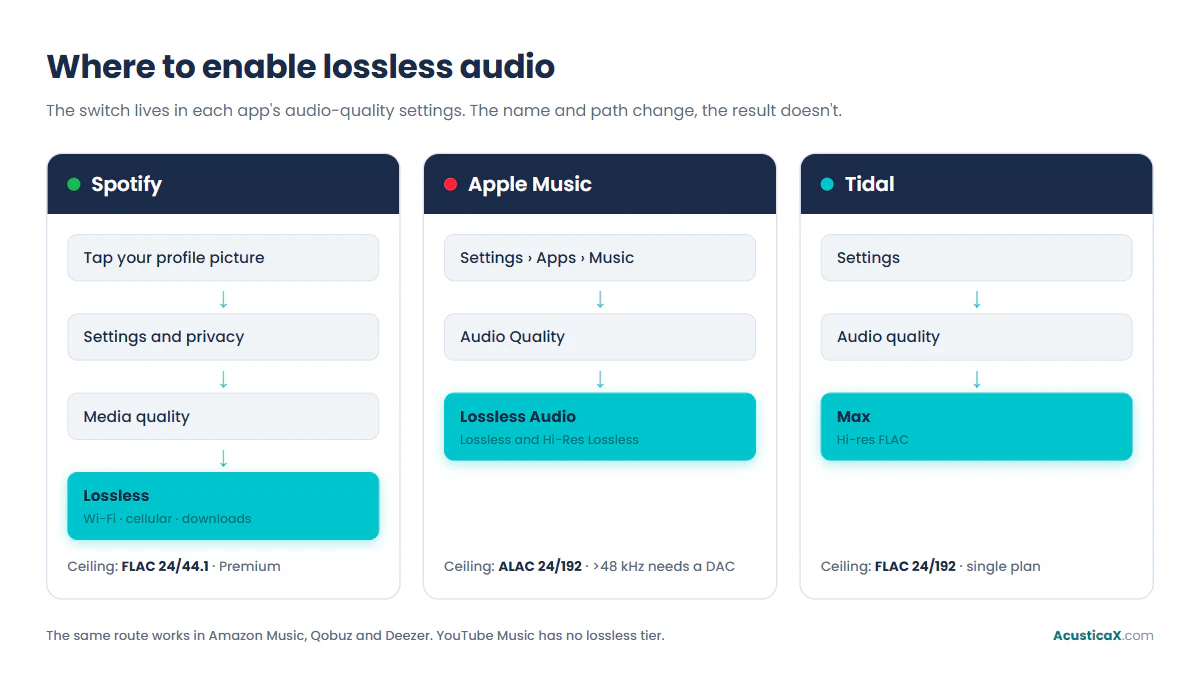
The lossless switch lives in each app’s audio-quality settings, and every service turns it on in under a minute. What changes is the name each one gives it and the exact menu path, so here are the concrete steps for the six big platforms.
Turning on lossless in Spotify
In Spotify the setting is called Lossless and delivers FLAC up to 24-bit, 44.1 kHz, CD quality, included in Premium since September 2025. On mobile, tap your profile picture, go to Settings and privacy, open Media quality, and choose Lossless for Wi-Fi, cellular, and downloads. On desktop the path is identical from your profile picture. The setting only shows up in the mobile app 9.0.58 or later and the desktop app 1.2.67 or later, it doesn’t apply to music videos, podcasts, or audiobooks, and Spotify recommends a steady connection of at least 1.5 Mbps. One detail almost nobody reads: those 24 bits reach you wirelessly only through Spotify Connect to a compatible speaker or receiver over Wi-Fi, not over your phone’s Bluetooth.
The two tiers in Apple Music
Apple Music offers two tiers, Lossless (ALAC up to 24-bit, 48 kHz) and Hi-Res Lossless (up to 24-bit, 192 kHz), both included in the individual plan. On an iPhone or iPad, go to Settings, tap Apps, tap Music, open Audio Quality, and turn on Lossless Audio, as Apple’s support page explains. Hi-res above 48 kHz needs an external converter on most devices, though the 14-inch and 16-inch MacBook Pro play it natively up to 96 kHz. Over Bluetooth the limit is different, and we cover it in detail below.
Tidal, Amazon Music, Qobuz, and Deezer
On the other four majors the routine repeats. Open the app’s audio-quality settings and pick the top tier. In Tidal, go to Settings, then Audio & Playback, and choose Max for Wi-Fi and cellular streaming, with FLAC up to 24/192, ever since it merged its old HiFi tiers and dropped the MQA format in April 2024. Amazon Music Unlimited splits its quality into HD (FLAC 16/44.1) and Ultra HD (up to 24/192) in the streaming settings. Qobuz also reaches 24/192 and, unlike the rest, doesn’t normalize volume, so it keeps the master’s dynamic range. Deezer offers its high-fidelity tier in CD-quality FLAC (16/44.1), without going hi-res.
YouTube Music, the one with no switch
YouTube Music is the only major platform that in 2026 still has no lossless tier. It tops out at 256 kbps lossy (AAC or Opus) on the High setting of Premium. That sounds fine for most listening, but if you came to enable lossless, there is no switch to flip here.
| Service | Setting name | Where it lives | Plan |
|---|---|---|---|
| Spotify | Lossless | Profile › Settings and privacy › Media quality | Premium |
| Apple Music | Lossless Audio | Settings › Apps › Music › Audio Quality | Individual |
| Tidal | Max | Settings › Audio & Playback | Single plan |
| Amazon Music | Ultra HD | Streaming & download settings | Unlimited |
| Qobuz | Hi-Res | Settings › Streaming quality | Studio |
| Deezer | High Fidelity | Settings › Audio quality | Premium |
| YouTube Music | None | – | – |
Set up your phone, PC, or Mac so nothing spoils it
Turning on lossless in the app is half the job. The operating system can resample the audio to its own fixed rate (often 48 kHz) and lose the file’s original 44.1 kHz, especially on a computer. These are the settings worth checking on each platform.
On Android, the codec and download quality
On Android the limit usually sits in the Bluetooth link, not the system. If you listen wired or through the speakers, just raise the streaming and download quality inside the app. If you go over Bluetooth, first enable Developer options (tap Build number seven times under About phone) and open them. There, under Bluetooth audio codec, you can force LDAC or aptX if your headphones support it instead of letting the phone negotiate the lowest codec, and under the LDAC playback quality you can pick its highest rate, which resets to best-effort when you reconnect.
On iPhone and iPad the output decides the rest
On iPhone and iPad there is no system resampling to touch, so the Apple Music setting you already turned on is in charge. The output decides the rest. Over Bluetooth you always drop to AAC, so real lossless needs a cable. A USB-C or Lightning to headphone-jack adapter converts the signal to analog for wired headphones, and through that path it does arrive intact up to 24-bit, 48 kHz.
Avoiding the resample on Windows
On Windows the system mixer resamples everything to a fixed rate. The first step, which already helps, is to open the playback device’s properties and, on the Advanced tab, set 24-bit and 44,100 Hz, your music’s rate. For true bit-perfect output that skips the mixer, you need a player that talks straight to the sound card over WASAPI in exclusive mode, such as foobar2000, or the exclusive mode built into the Tidal and Qobuz apps. The system’s “exclusive control” checkbox only lets an app request it, it doesn’t force anything on its own.
Setting the output rate on a Mac
On a Mac, first turn on lossless in the Music app (Music menu, then Settings, the Playback tab, Audio Quality). Then open Audio MIDI Setup, in the Utilities folder, and set the output to 24-bit and your music’s rate, 44,100 or 48,000 Hz. Apple Music does not change that rate on its own, so if your track is 44.1 kHz and the output sits at 48, macOS resamples it without warning. Setting it by hand per session, or leaving it at the rate you play most, avoids that silent loss.
Why Bluetooth undoes lossless
You can enable lossless in every app and still not hear it over Bluetooth. The wireless link re-encodes the music to fit its bandwidth, so out of the 1,411 kbps of a CD-quality FLAC you get quite a bit less. It is the weakest link in nearly any chain, and no in-app switch fixes it.
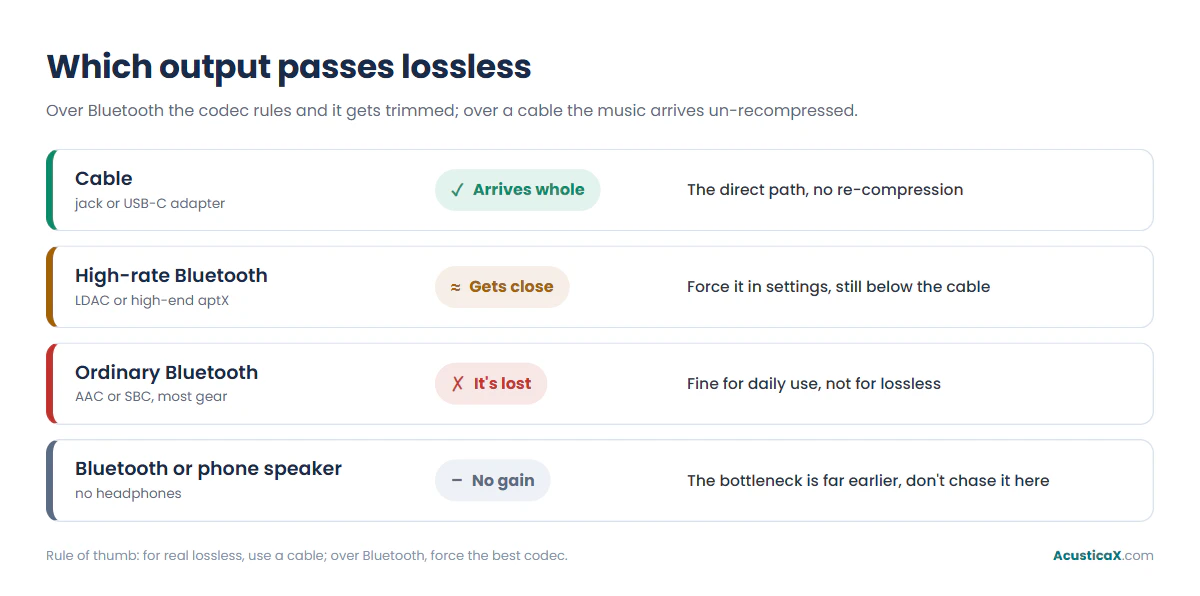
The good news is that you can improve the link. On Android, Developer options let you see which codec is active and force the highest-rate one your headphones support. The best ones get close to CD quality, but only when both the phone and the headphones carry them, and even then none matches a cable. AirPods are the clearest example of the ceiling. From an iPhone, iPad, or Mac they all use the AAC codec, and Apple itself states that Bluetooth connections aren’t lossless; the only wireless lossless path is the recent models (AirPods 4 or later, AirPods Pro 3, and AirPods Pro 2 with a USB-C case) connected to an Apple Vision Pro, plus AirPods Max over the USB-C cable. How much each codec trims, with the numbers for each one, is covered in our guide on whether you actually need lossless audio.
| Output | Does lossless arrive? | What to do |
|---|---|---|
| Cable (jack or USB-C adapter) | Yes, whole | The direct path, no re-compression |
| Ordinary Bluetooth (AAC or SBC) | No, it’s lost | Fine for daily use, not for lossless |
| High-rate Bluetooth (LDAC or high-end aptX) | Gets close | Force it in settings, still below the cable |
| Bluetooth or phone speaker | No gain | The bottleneck is far earlier, don’t chase lossless here |
Get the most from the gear you already own
Before buying a converter or new headphones, squeeze what you already have, because the wired output beats almost everything else. If your phone still has a jack, use it. If not, a USB-C to headphone-jack adapter for five to fifteen dollars with its own converter pulls the signal out of the phone and skips Bluetooth in one move.
A decent pair of wired headphones already sitting in a drawer outperforms pricey wireless ones for this specific job, because they don’t re-compress. On a computer, the bit-perfect output you saw earlier costs nothing. An external converter with amplification only helps when your headphones demand more voltage than the phone delivers, something you can check with the headphone amplifier calculator before spending. And it pays to be honest about the starting point: on a Bluetooth speaker or the phone’s own speaker you won’t notice lossless at all, since the bottleneck arrives well before the file. While you’re at it, check how high you can still hear, since that sets how much of the improvement you’ll actually perceive.
Can you really hear the difference? Test it
Before reshuffling your gear for lossless, prove to yourself blind that you can actually tell it apart. It is the step almost nobody takes and the one that saves the most money. Run a blind ABX test with your two versions of the same track, the tool matches the volume, and only if you get it right enough times in a row is the difference real rather than in your head.
Check too that the file you call lossless really is. An MP3 repackaged as FLAC still sounds like an MP3, and the fake-lossless detector exposes it by reading the spectrum and spotting where the treble cuts off. And if what you doubt is whether lossless audio is worth it for how you listen, we cover that separately in the guide on who actually needs lossless audio.
Frequently asked questions
How do I enable lossless audio on Spotify?
Tap your profile picture, go to Settings and privacy, open Media quality, and choose Lossless for Wi-Fi, cellular, and downloads. The tier is FLAC up to 24-bit, 44.1 kHz, included in Premium since September 2025. Keep in mind those 24 bits reach you wirelessly only through Spotify Connect to a compatible device over Wi-Fi, not over the phone’s Bluetooth.
Do I need to pay for lossless audio?
Yes, the lossless tier sits inside the paid plans (Premium on Spotify, Unlimited on Amazon, and equivalents), though it costs nothing extra on top of a plan you may already have. No free plan offers it: Spotify Free stops around 160 kbps lossy and Deezer Free serves 128 kbps with ads. Your own FLAC files, however, play losslessly for free in any player.
How do I get lossless if I use Bluetooth headphones?
To hear it truly lossless, plug in wired or USB-C headphones, or send the music to a Wi-Fi speaker with Spotify Connect instead of Bluetooth. If you stay on Bluetooth, force the highest-rate codec that both your phone and your headphones support, though it will still arrive with some loss. The why, codec by codec, is in our guide on whether you need lossless audio.
Do AirPods support lossless audio?
From an iPhone, iPad, or Mac, no: every AirPods model uses the AAC Bluetooth codec, and Apple itself states that Bluetooth connections aren’t lossless. There are two exceptions. Over a cable, AirPods Max with the USB-C connector do receive lossless audio. And wirelessly, only the recent models (AirPods 4 or later, AirPods Pro 3, and AirPods Pro 2 with a USB-C case), and only when connected to an Apple Vision Pro.
How do I enable lossless on iPhone in Apple Music?
On an iPhone or iPad go to Settings, tap Apps, tap Music, open Audio Quality, and turn on Lossless Audio. The Lossless tier reaches ALAC 24-bit, 48 kHz, and Hi-Res Lossless goes up to 24/192, though the latter needs an external converter on most devices (the 14-inch and 16-inch MacBook Pro are the exception, with up to 96 kHz native).
Can you listen to lossless for free?
Not entirely free, no platform gives away its lossless tier. What is free is turning it on if you already pay for the plan, and using the one-to-three-month trials most services offer before charging. And if you have your own FLAC or WAV files, they play losslessly at no cost in any phone or PC player.
Does lossless audio use more data?
Quite a bit more, and Apple itself warns about it. A CD-quality FLAC runs around 1,000 kbps versus 320 for a lossy file, so it multiplies the data use by three or four. That’s why nearly every app lets you set the Wi-Fi, cellular, and download quality separately, to avoid burning through a data plan by accident.
Do I need a DAC for lossless audio?
Not to start. CD-quality lossless (16-bit, 44.1 kHz) comes out fine through the phone’s jack or a cheap USB-C adapter, and so does the 24-bit, 48 kHz tier. An external converter is needed for hi-res above 48 kHz, or when your headphones demand more voltage than the phone can deliver, not as the first step.