For music, a file at 256 or 320 kbps in MP3 or AAC sounds the same as the original to almost any ear under normal conditions. Moving up to a lossless format like FLAC (which keeps the full sound of a CD) roughly triples the file size and only shows on very demanding material played on good gear. Below 192 kbps you do start losing detail that an attentive listener can pick out on decent headphones.
So, what bitrate do I need for music? The honest answer has a catch. The number that really matters is not set by the file you download but by the weakest link in your listening chain and by what you are playing. A phone speaker can barely tell a 128 kbps MP3 from a FLAC, while a hi-fi rig with a demanding recording can expose even a 256. This guide shows how many kilobits per second each format uses, how much space it takes, and above all when the difference is actually audible.
What is bitrate, and why is 320 kbps the ceiling for MP3?
Bitrate is the amount of data one second of audio takes up, measured in kilobits per second (kbps). More kbps means more information stored and less thrown away by the encoder. A 128 kbps MP3 keeps 128,000 bits for each second of music; at 320 kbps, two and a half times as much. That 320 is the ceiling for constant-bitrate MP3, which is why you see it everywhere as shorthand for “top quality” on downloads and music stores.
Lossy compression (MP3, AAC, Opus) works by discarding what the ear barely perceives, through what is called psychoacoustic masking. If a loud sound covers a quiet one close to it in frequency, the encoder deletes the quiet one. At 128 kbps it cuts quite a lot and some passages give it away; at 320 the trimming is so subtle that almost nobody tells it from the original. Lossless compression (FLAC, ALAC) does something else, packing the sound like a ZIP, cutting it down by roughly half and returning it bit for bit, throwing nothing away.
Why VBR V0 matches 320 while taking up less space
You do not need to lock in 320 kbps to get a transparent MP3. With variable bitrate (VBR), the LAME encoder spreads the bits according to how complex each moment is, spending more on a drum fill than on a silence. The V0 setting averages about 245 kbps and sounds the same as a fixed 320 (CBR) while taking up roughly 20% less; V2 drops to about 190 kbps and is still very hard to catch. In other words, “320 fixed” is not the best you can have, only the largest. The Hydrogenaudio community has recommended V0 for years as the sweet spot between quality and size.
How much space each audio bitrate takes and how good it sounds
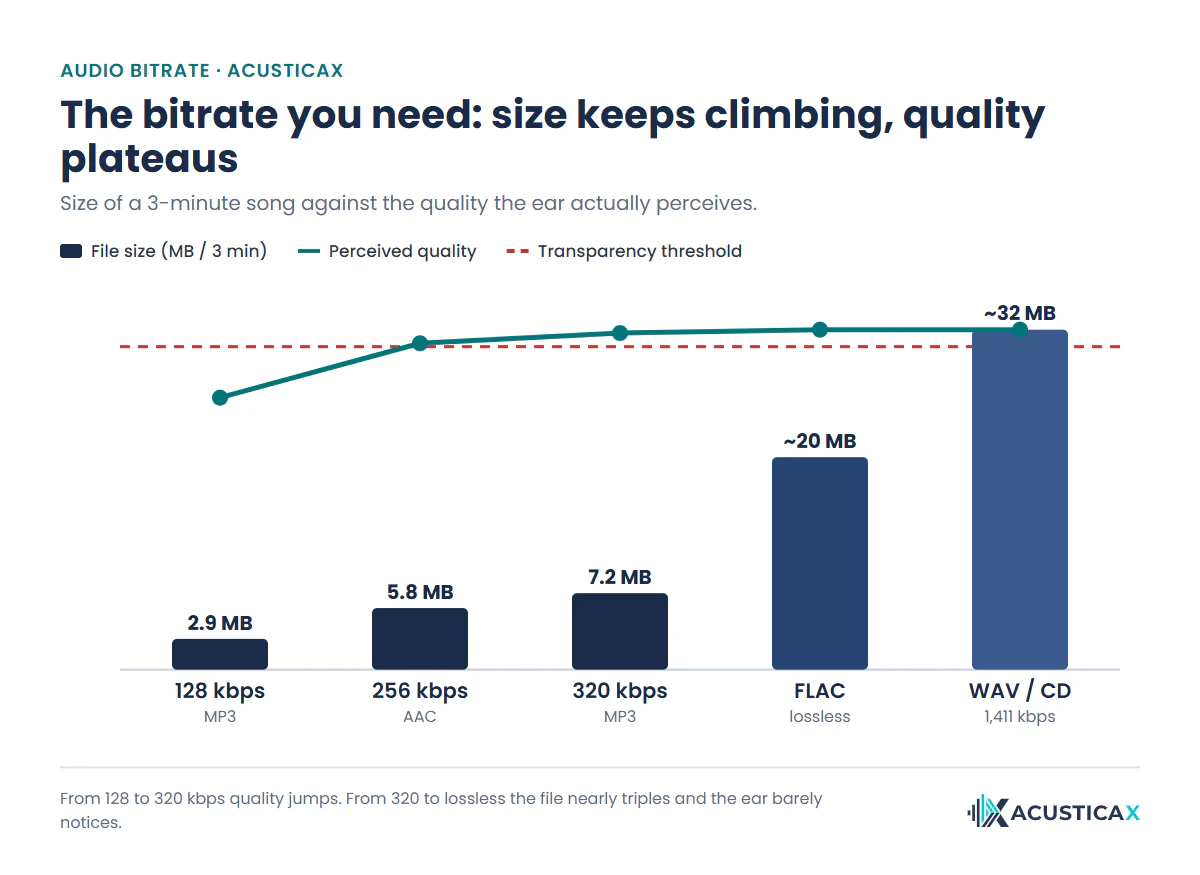
A three-minute song goes from under 3 MB to more than 30 depending on the bitrate, yet the quality the ear perceives stops improving long before the file stops growing. Here is the relationship between bitrate, format, size and quality at each step.
| Bitrate | Format | Size (3 min) | Quality |
|---|---|---|---|
| 96-128 kbps | MP3 / AAC | 2.2–2.9 MB | Basic |
| 192 kbps | MP3 | 4.3 MB | Good |
| 245 kbps | MP3 VBR (V0) | 5.5 MB | Transparent, lighter than 320 |
| 256 kbps | AAC | 5.8 MB | Transparent |
| 320 kbps | MP3 | 7.2 MB | MP3 ceiling (constant bitrate) |
| ≈900 kbps | FLAC / ALAC | ~20 MB | Lossless (CD quality) |
| 1,411 kbps | WAV / CD (PCM) | ~32 MB | Uncompressed reference |
Look at the quality jump. From 128 to 320 kbps the improvement is clear, because at 128 the encoder is still trimming audible things. From 320 to lossless the file nearly triples, yet what the ear gains is tiny. That is the trap of paying for lossless “just in case”, since almost all the benefit is already there at 256 or 320.
When can you actually hear the bitrate difference?
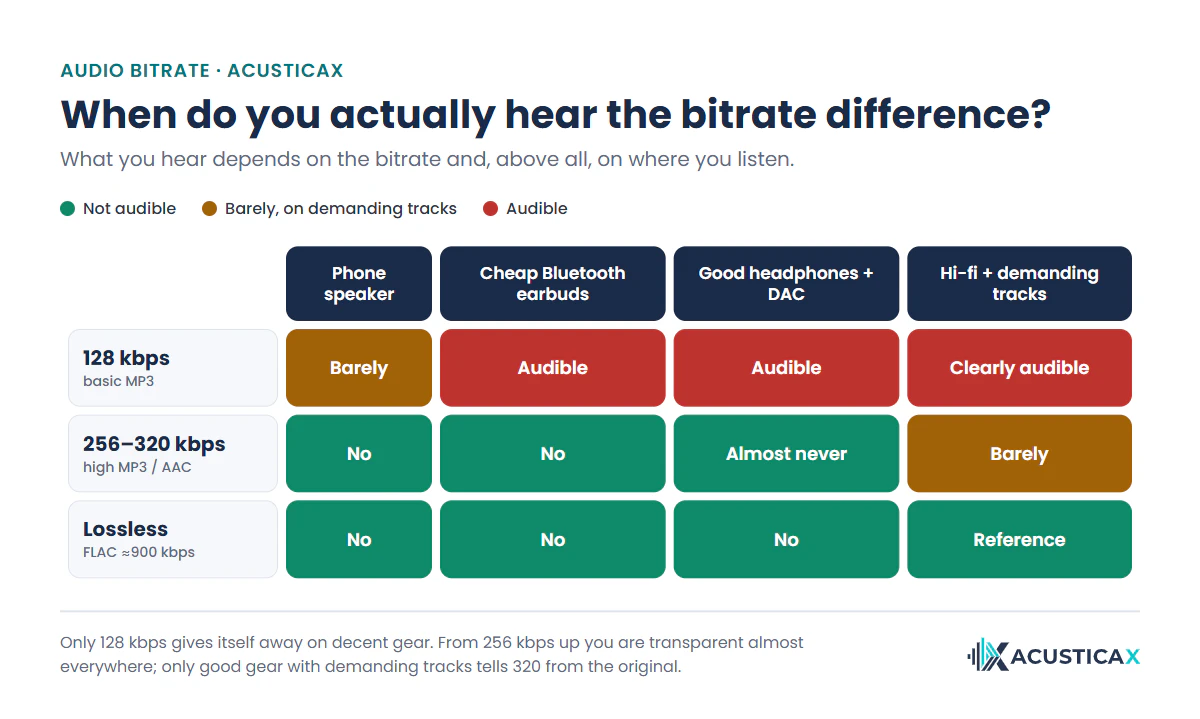
You hear it when three things line up, a low bitrate, gear able to reveal the detail, and a recording that demands that detail. If any of the three is missing, the difference vanishes. That is why the same 128 kbps MP3 sounds passable through a phone speaker and poor through good headphones with a DAC. The matrix below sums up where each quality gives itself away.
The material decides what you hear
Some recordings put MP3 against the ropes. A round of applause, cymbals or a harpsichord have broadband noise and very fast transients, exactly what lossy compression handles worst. On those hard passages a 128 kbps leaves audible artifacts, a metallic wash on the highs that Hydrogenaudio calls swirling, and on sharp attacks an echo before the hit (pre-echo); even a 192 can struggle. With well-produced, loudly mastered pop, on the other hand, telling a 256 from the original is extremely hard.
Your listening chain matters more than the file
The weakest link sets the limit. A phone speaker compresses its own dynamic range and adds distortion, so not even the best FLAC shines there, and any background noise buries the fine detail. A cheap Bluetooth earbud adds another layer, because the wireless codec compresses the signal again before it reaches your ear. Playing a 1,411 kbps FLAC over SBC re-encodes it to around 328 kbps effective, so paying for lossless to hear it through a Bluetooth speaker gains you nothing. We walk through the Bluetooth bottleneck, codec by codec in the guide on who needs lossless audio.
Your ears and your age count too
Much of what a low-bitrate MP3 trims lives in the top end, above 14 or 16 kHz, and that is precisely the first range hearing loses with age. Past 40, many adults no longer hear above 15 kHz, which makes the cuts of a 128 kbps even less audible to them than to a teenager. Before spending on lossless, check how high a frequency you can still hear, because if your ceiling sits at 15 kHz, much of what a big file adds falls outside your reach.
320 kbps vs lossless: is the big file worth it?
In 320 kbps vs lossless, the difference in sound is almost always nil and the difference in size is huge. A 320 kbps takes about 7 MB per song; the same track in FLAC is around 20, and in WAV over 30. Across a library of 5,000 songs that is roughly 35 GB against 100 or 160. For archiving a collection, editing audio or a hi-fi system with good recordings, lossless makes sense, because it keeps the master intact and survives future conversions. For listening on a phone, in the car or over wireless headphones, it is dead weight. We dig into why a 320 kbps MP3 is almost indistinguishable from the original in FLAC vs MP3, the difference you can actually hear.
The real advantage of lossless is not always what it sounds like but what it guarantees, since you start from a perfect copy with no generations of re-compression on top. And if you want to make sure a FLAC you downloaded is genuine rather than an MP3 repackaged with a changed extension, run it through the fake lossless detector, which reads its spectrum and tells you whether the high-frequency cutoff betrays earlier compression.
Which format to choose at each bitrate
Format matters as much as bitrate, because some compress better than others. Opus, the most modern one, already sounds transparent at 96 or 128 kbps, half what an equivalent MP3 needs, and it is what YouTube and many messaging apps use. AAC outperforms MP3, to the point that its 256 kbps match MP3’s 320 kbps, which is why it is the standard for Apple Music and YouTube Music. MP3 is the oldest and least efficient, though also the most compatible with any player. To lose nothing, FLAC and ALAC store the sound identical to the master and take up the same as each other; the one practical difference is that ALAC fits better in Apple’s ecosystem. If you want to know which format and edition a record came out in, you can look up the album details, its year and its track list.
What bitrate do I need for music? It depends on how you listen
The honest recommendation depends on where and how you listen, not on chasing the highest number. This table sums up the bitrate that suits each situation, with the space saving as a tie-breaker.
| How you listen | Recommended bitrate | Why |
|---|---|---|
| Phone on the go with limited data | 160-192 kbps AAC | Good sound over background noise, sips data |
| General use with headphones | 256 kbps AAC or 320 kbps MP3 (or VBR V0) | Transparent for almost everyone, reasonable size |
| Car over Bluetooth | 256-320 kbps | The wireless codec trims it anyway, lossless adds nothing |
| Wired hi-fi system | FLAC / ALAC lossless | The intact master shines with good recordings |
| Archiving and editing | FLAC (or WAV to edit) | A perfect copy that survives future conversions |
Your streaming bitrate (Spotify, Apple Music and the rest)
Each platform has its own quality ladder, and in 2025 almost all of them added a lossless tier. Spotify Premium reaches about 320 kbps on its “Very high” setting and, since September 2025, offers FLAC up to 24-bit/44.1 kHz; its free account tops out at “High,” about 160 kbps. Apple Music uses AAC at 256 kbps and adds lossless ALAC up to 24-bit/192 kHz, while Tidal, Amazon Music and Qobuz also reach high resolution. The service-by-service table, with every tier and price, is in our music streaming quality comparison, but what matters here is that from the “high” tier up, they all sit around the transparency threshold.
If you already pay for one, the guide on how to enable lossless audio shows where the switch lives in each app. And if you are weighing whether your platform’s lossless tier or high-resolution audio are worth the price bump, we look at that in the guide on whether high-resolution audio is worth it.
Test it yourself with a blind trial
The only honest way to know what bitrate you need is a blind test, where you cannot see which one is playing at any moment. Memory and expectation fool us, and when we know we are hearing the “good” file we tend to believe it sounds better even when it is the same one. In a blind ABX test you load your two versions, the system matches the volume and challenges you to tell them apart; only if you get it right enough times in a row is the difference real rather than suggestion.
Run the test with a demanding clip (percussion, bare vocals, a passage with cymbals) and on the gear you usually listen with. Many listeners find out this way that their ear tops out at 256 kbps and stop hoarding giant files. Others confirm that on their good chain they do hear the lossless, and then the outlay makes sense. Either way, you will have swapped a belief for a fact.
Frequently asked questions
MP3 128 or 320 kbps: which is better?
320 kbps is clearly better than 128. At 128 kbps the encoder trims audible detail, mostly in the highs and in complex passages, and it shows on decent headphones. Comparing 128 vs 320 kbps is the one bitrate jump almost anyone can tell on normal gear; above 256 the difference is already very hard to hear.
Is 320 kbps good enough?
Yes. 320 kbps is good quality and for the vast majority of people it is indistinguishable from the original in normal listening. It is the MP3 ceiling and the “Very high” tier on streaming services. Only with very demanding material and a hi-fi system could a well-trained listener notice anything, and not even always.
Which bitrate is best for music?
For general use, 256 to 320 kbps. That range more than covers listening on a phone, in the car or on headphones without losing anything noticeable. If you want to save space, a VBR V0 (about 245 kbps on average) sounds the same as 320 and weighs less. Below 192 kbps the compression starts to show.
Is 256 kbps good quality?
256 kbps in AAC is high, transparent quality for almost everyone. AAC is more efficient than MP3, so a 256 kbps AAC sounds on par with a 320 kbps MP3. It is the standard for Apple Music and YouTube Music precisely because it delivers excellent sound while taking up less.
Can you hear the difference between 320 kbps and FLAC?
Almost never. In blind tests, the vast majority of people cannot tell a 320 kbps from a FLAC in normal listening. The FLAC’s edge shows only with a hi-fi system, demanding recordings and a trained ear, and even then it is subtle. Test it yourself with an ABX before assuming you hear it.
Does Spotify use 16 or 24 bit?
Both, depending on the tier. Spotify’s lossy tiers run at roughly 24, 96, 160 and 320 kbps, with the free account topping out at “High” (about 160 kbps) and “Very high” (about 320 kbps) reserved for Premium. Since September 2025, Premium also adds a lossless FLAC tier at 16-bit and 24-bit up to 44.1 kHz.
320 kbps or lossless for the car or Bluetooth?
320 kbps is plenty. Over Bluetooth, the wireless codec (SBC, AAC, aptX) compresses the signal again before it reaches the speaker, so a lossless file is re-encoded anyway and its edge is lost along the way. In the car, with road noise in the background, the difference is even less noticeable. Save lossless for wired listening.
Is VBR or CBR better, and what does V0 mean?
For MP3, VBR (variable bitrate) is usually the better choice over CBR (constant bitrate), because it assigns more bits to complex passages and fewer to simple ones. V0 is the top-quality VBR setting of the LAME encoder, averaging about 245 kbps and sounding the same as a 320 CBR while taking roughly 20% less space. The one reason to use fixed 320 is compatibility with old players that handle VBR poorly.