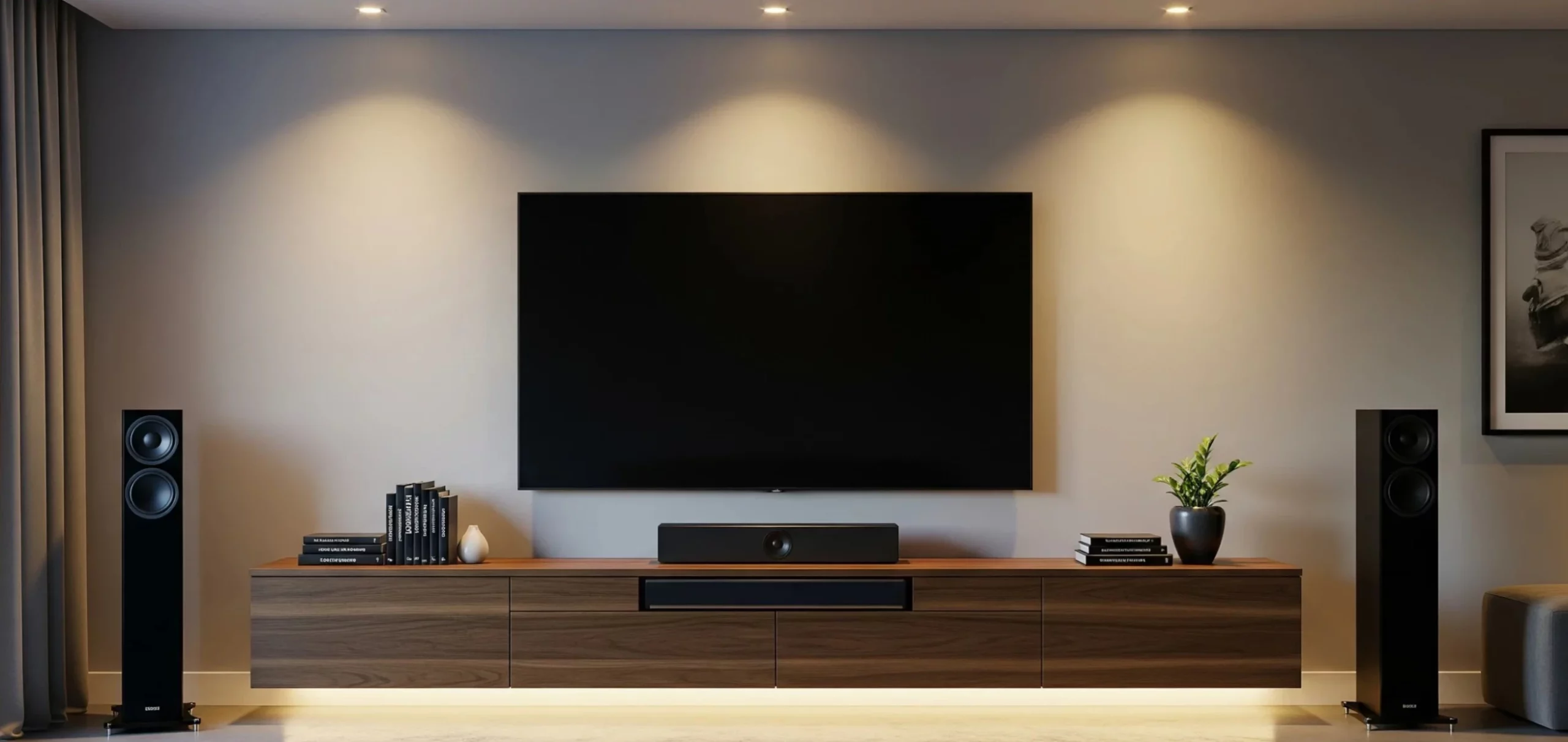
To organize and hide TV cables without opening the wall, run them down a paintable cord cover to the baseboard and bundle the rest behind the media console with hook-and-loop straps. To hide them inside the wall, drop the low-voltage cables (HDMI, coax, network and speaker wire) through the stud bay or a conduit, and get power behind the TV with a UL-listed in-wall power kit or a recessed outlet put in by an electrician. Running the TV’s own power cord or an extension cord through the wall breaks the National Electrical Code. If you use conduit, go for 1-inch on a straight run and 1¼-inch if it bends, because the plastic head on a standard HDMI cable is bigger than most people expect.
Hiding the wires also changes the sound. A surround speaker 13 feet away in a straight line can need twice that much wire once the run follows the baseboard, and thin wire loses level. Power cords bundled with the subwoofer cable bring hum. And a receiver squeezed into a cabinet runs hot, while Yamaha asks for a foot of clear space above its models. Below you’ll find each method with its numbers, what the US and UK rules say, and how to check at the end that every speaker plays where it should. The figures come from manufacturers’ spec sheets and the electrical codes, checked in October 2026, plus our own calculations.
How to hide TV cables on a wall-mounted TV
There are three ways, depending on how much you’re willing to cut. A cord cover, a slat panel or a tall console hides the drop in an afternoon with no cutting at all. In drywall, two holes and a pull through the stud bay hide the HDMI and coax. In a brick or block wall, you need a chase cut for conduit. In the last two cases the power cord can’t go inside the wall, and the next section explains why.
| Method | Work involved | Which cables | Power cord? | Best for |
|---|---|---|---|---|
| Cord cover | None (adhesive) or a few screws | All of them | Common practice, in a cover with a divider (see the NEC note below) | Rentals, or a wall you don’t want to open |
| Slat or wood panel behind the TV | Mounting the panel | All, behind the panel | Yes, behind the panel | You also want a feature wall |
| Tall console or column under the TV | None | Whatever drops to the console | Yes | The TV hangs low, close to the furniture |
| In-wall kit through drywall | Two holes with a hole saw | HDMI, coax, network, speaker wire | Only through the kit’s in-wall-rated power cable | Hollow drywall |
| Chase cut with conduit | Cutting, conduit and patching | Low-voltage in its own conduit | Only as new wiring by an electrician, in a separate run | Renovations, brick or block walls |
Hide TV cables without cutting the wall
A paintable cord cover is the fastest fix and the least visible once it matches the wall. Cut a length from the bottom edge of the TV down to the console or the baseboard, stick or screw the base to the wall, lay the cables in and snap the lid shut. The adhesive kind needs no drilling, but, as mount maker Vogel’s points out, it doesn’t hold as well as one that’s screwed on. A slat panel behind the TV or a tall console below it does the same job without a cover, since the cables drop behind it out of sight.
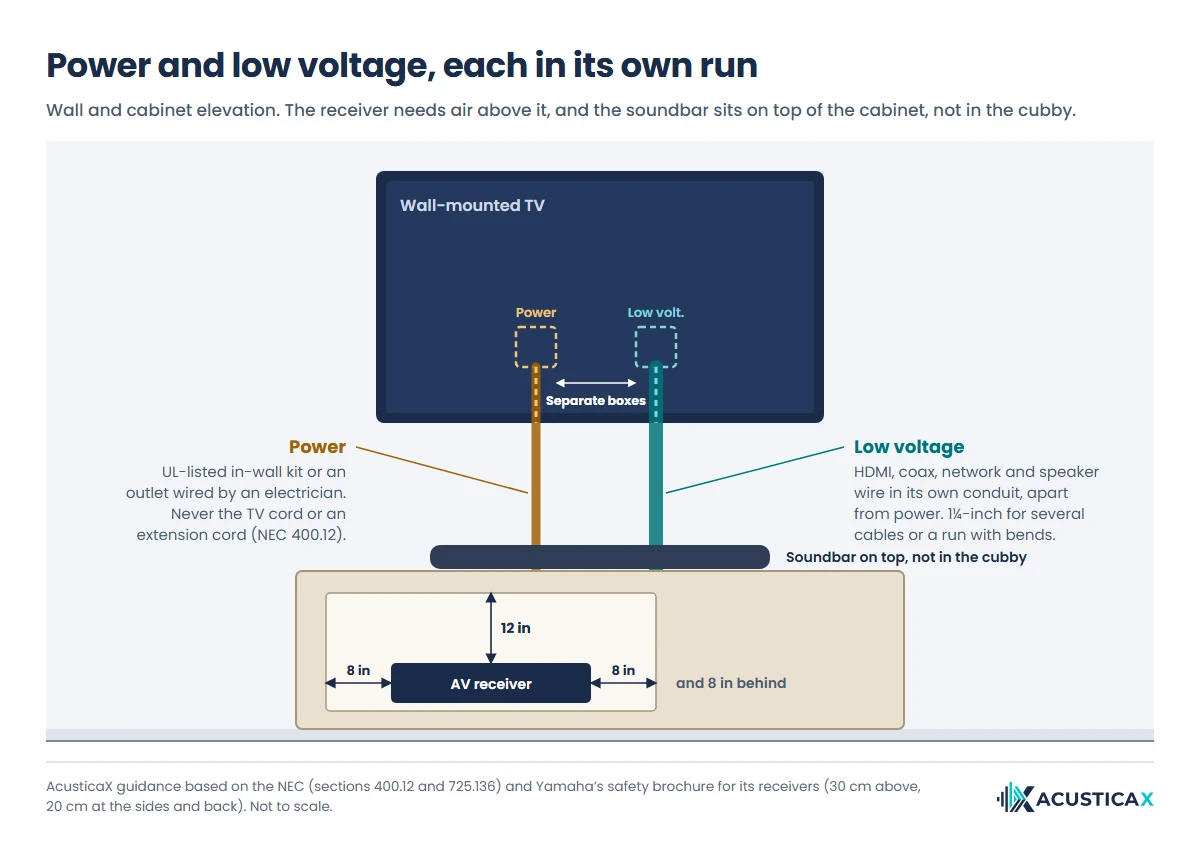
Most people run the TV’s power cord in the same cover, and a cover that carries power and signal should have a divider between them. Strictly, though, NEC section 400.12 bars flexible cords attached to building surfaces or installed in raceways, so the by-the-book route for a wall-mounted TV is an in-wall power kit. Behind the console, good home theater cable management starts with grouping cables by job with hook-and-loop straps (power on one side, HDMI on another, speaker wire on a third) and keeping them snug, not cinched. Crutchfield points out that overtightening can deform a cable and crimp the conductors inside. If the TV sits on a full-motion mount, leave as much slack as the arm extends from the wall, or the cable will yank the connector every time you swing it.
In drywall, two holes and a fish tape
In a hollow wall, cut one opening behind the TV and another at console height, both in the same stud bay, and drop the cables between them with a fish tape. Find the studs and any horizontal fire blocking first, and stay clear of existing electrical runs. Low-voltage mounting brackets and brush wall plates finish both openings. HDMI, coax, network and speaker wire can go this way, and the speaker wire must carry an in-wall rating, CL2 or CL3, which Crutchfield calls required for in-wall runs. The TV’s power cord can’t go this way, but an in-wall power kit solves it, as you’ll see below.
Brick and block walls need a chase
In a solid wall you cut a chase from behind the TV down to the console, set a conduit into it, patch over and paint. It’s the cleanest result and the one you can’t undo, which means the conduit must be wide enough for today’s cable and for the one you’ll swap in five years from now. Plug both ends with a rag before patching, since one lump of plaster inside is enough to stop an HDMI head, and leave a pull string in for the next cable. How wide that conduit has to be is covered a bit further down.
Can you run a TV power cord through the wall?
Not the TV’s own cord or an extension cord. In the US, NEC section 400.12 says flexible cords can’t substitute for the fixed wiring of a building, can’t run through holes in walls and can’t be concealed by walls, ceilings or floors, as installer The TV Mount Men sums up. The two legal routes are a UL-listed in-wall power kit, such as the recessed TV connection kits from Legrand, which plug into an existing outlet and carry power through in-wall-rated cable, or a new recessed outlet behind the TV, wired by an electrician.
In England, adding a socket behind the TV from an existing circuit, outside a bathroom, isn’t notifiable work under Approved Document P. Across the UK it still has to meet BS 7671. Cables buried less than 50 mm deep without mechanical protection must run in the safe zones (straight up, down or across from an accessory) and be protected by a 30 mA RCD, as the IET explains, which is why it’s a job for an electrician.
Where the outlet behind the TV should go
Inside the TV’s outline, above its bottom edge and clear of the mount plate, so nothing shows from any angle. If the TV hangs close to the wall, a recessed box or a flat right-angle plug keeps the plug from pushing on the screen. While the electrician is there, have the low-voltage opening put next to it in its own box.
Can power and HDMI share a box or conduit?
No. The NEC keeps Class 2 and Class 3 cables, the category in-wall speaker wire and HDMI cables rated CL2 or CL3 fall into, out of any raceway, enclosure or outlet box that holds power conductors unless a barrier separates them (section 725.136 in the 2020 edition). That’s why in-wall power kits put power and cables through separate openings, and why a cord cover that carries both should have a divider. Hum calls for even more distance than a barrier, as you’ll see further down.
HDMI conduit size, 1 inch straight and 1¼ with bends
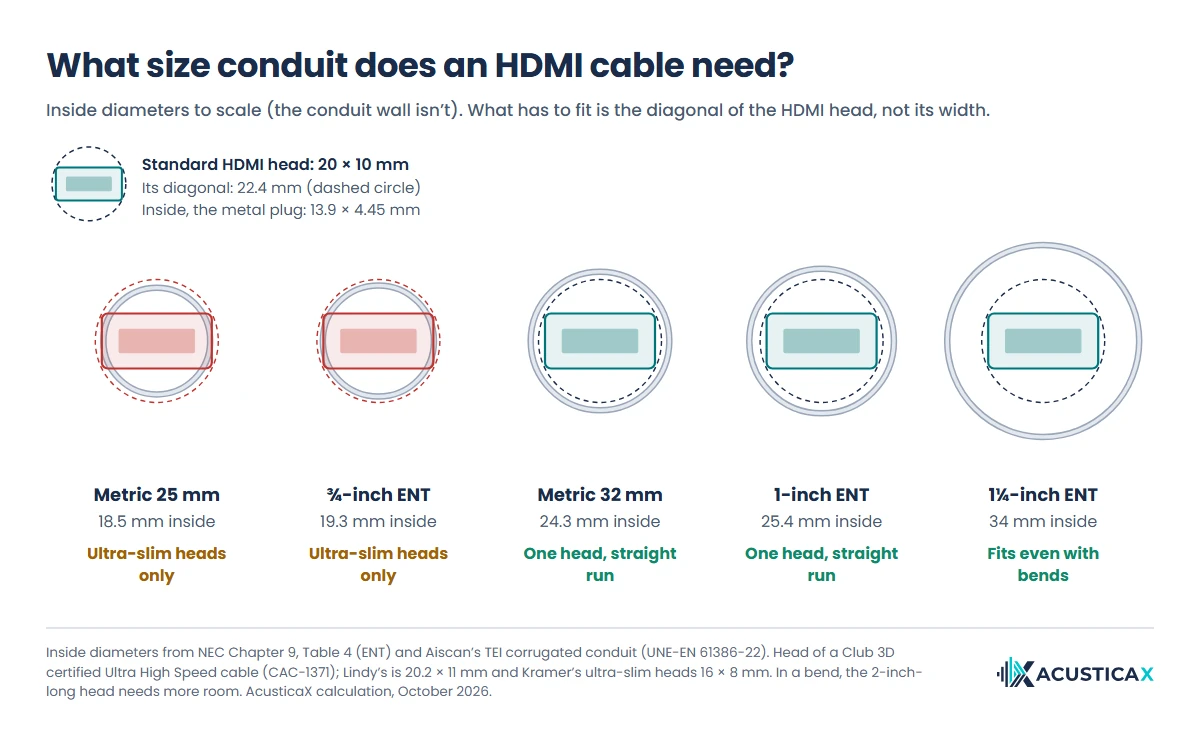
A 1-inch conduit, which measures 25 to 26 mm inside, is the smallest that passes the head of a standard HDMI cable, and only on a straight run between boxes. With bends, or with more than one cable, use 1¼-inch. What has to fit is the diagonal of the plug, because a rectangle only fits inside a circle if its diagonal is no longer than the diameter, however you turn it. The metal part of an HDMI plug is 13.9 × 4.45 mm, but the molded head is a lot bigger. On a certified Ultra High Speed cable from Club 3D it’s 20 × 10 mm, and on a Lindy fiber HDMI, 20.2 × 11 mm. And at about 2 inches (5 cm) long, a rigid head needs even more room than its diagonal in a tight bend.
| Conduit | Inside diameter | What gets through |
|---|---|---|
| ½-inch ENT | 0.56 in (14.2 mm) | No HDMI head (the metal part alone is 14.6 mm on the diagonal) |
| ¾-inch ENT | 0.76 in (19.3 mm) | Only 16 × 8 mm ultra-slim heads, with no room to spare |
| 1-inch ENT or Schedule 40 PVC | 1.00–1.03 in (25.4-26.1 mm) | One standard head (about 20 × 10–11 mm, 22 to 23 mm diagonal) at a time, on a straight run |
| 1¼-inch ENT or PVC | 1.34–1.36 in (34-34.5 mm) | A standard head even with bends, and other cables alongside |
| Metric 25 mm corrugated (UK, EU) | 18.5 mm | Only ultra-slim heads |
| Metric 32 mm corrugated | 24.3 mm | One standard head at a time, on a straight run |
Metric conduit, common in the UK, Europe and Australia, is sized by its outside diameter, which is why the “25 mm” kind is so tight inside. Spanish manufacturer Simon puts it plainly: anything under 32 mm limits the installation of a standard HDMI cable. The 16 × 8 mm ultra-slim heads that squeeze through belong to cables like Kramer’s, a High Speed cable up to 3 m long that isn’t Ultra High Speed or certified for eARC. Three more rules save you grief. Keep bends to a minimum, since the NEC caps conduit runs like ENT at 360° of bends (four quarter bends) between pull points. Test the cable with the TV on before you patch the wall. And if you plan HDMI, coax and network together, use a 1¼-inch conduit, or two 1-inch ones on a straight run.
Which HDMI cable to put in the wall
A certified Ultra High Speed cable, even if your TV is 4K at 60 Hz. HDMI Licensing Administrator recommends it for anyone installing cables “in inaccessible locations such as inside walls”, because it’s the one you won’t have to replace. Look for the certification label on the box, whose QR code confirms the brand, model and length, and for the cable name printed on the jacket. In the US, the jacket should carry an in-wall fire rating such as CL2 or CL3. Both Ultra cables (Ultra High Speed and the newer 96 Gbps Ultra96) are designed for eARC, the link that carries lossless Dolby Atmos and DTS:X from the TV to your receiver or soundbar. eARC may work over a High Speed cable with Ethernet, but that cable isn’t certified for it. If surround drops out after the swap, see why surround sound stops working over eARC.
For runs longer than a few meters, the same organization notes that Ultra High Speed performance is realistically only reachable with active cables, usually fiber. Those cables are directional. One end goes to the source (the player or the receiver) and the other to the display, and if you plug it in backwards nothing breaks, but nothing works either. If you push it from the cabinet up to the TV, lead with the display end and you won’t have to pull it out again. Watch eARC here too, since not every fiber HDMI cable passes it. Lindy says its 50-meter one doesn’t support eARC, ARC or CEC, while Digitus lists eARC and CEC for its 20-meter 8K fiber cable. HDMI Licensing Administrator says an active cable with the Cable Power feature and one of its labels, such as Ultra High Speed, will support ARC and eARC. If that cable links the receiver and the TV, check the spec sheet for eARC and test it with Dolby Atmos from a TV app before you close the wall.
When the HDMI head won’t fit the conduit
With a ¾-inch conduit already buried, there are three ways out without opening the wall. Fiber HDMI cables with detachable heads go through with a micro or mini HDMI end and get their full-size adapter on the other side. A mini-HDMI cable with adapters at both ends is the second, though Simon calls it a poor choice, because adapters attenuate the signal and the thin cable shortens the reach. Check picture and sound before you call it done. The third is to send the picture over network cable with an HDBaseT extender, good for up to 100 meters (328 feet). The network cable goes in without its plug and gets terminated on the far side, with a crimper or a keystone wall plate, so it fits even ½-inch conduit. HDBaseT tops out at 4K at 60 Hz, though, and whether it passes ARC or eARC depends on the extender. Skip cutting the HDMI cable to solder a new plug on, since its connector packs 19 contacts into 14 mm.
Speaker wire gauge for a run around the room
For 8-ohm speakers, 16-gauge wire is fine up to about 50 feet each way, and with 4-ohm speakers the same wire reaches about 25 feet. Beyond that, step up to 14 gauge. The math comes from asking the wire, out and back, to eat no more than 5% of the speaker’s impedance, which keeps the loss to about 0.4 dB. That rule lands exactly on Crutchfield’s speaker wire guide, which calls 16 gauge all you need for runs of 50 feet or less to 8-ohm speakers.
| Gauge (copper) | 8-ohm speakers | 6-ohm | 4-ohm |
|---|---|---|---|
| 18 AWG | 31 ft (9.5 m) | 23 ft (7 m) | 15 ft (4.6 m) |
| 16 AWG | 50 ft (15 m) | 37 ft (11 m) | 25 ft (7.6 m) |
| 14 AWG | 79 ft (24 m) | 59 ft (18 m) | 40 ft (12 m) |
| 12 AWG | 126 ft (38 m) | 94 ft (29 m) | 63 ft (19 m) |
The moment you hide speaker wire, the run gets longer. Surround speakers sit at ±110° from your seat, to the sides and a little behind (here’s where the surround speakers in a 5.1 system go), and the one 13 feet away in a straight line can need 26 to 33 feet of wire once it follows the baseboard, climbs the wall and goes around a door. With 4-ohm speakers, even 16 gauge, good for 25 feet, falls short, and you need 14. Measure the real route with a string, as Crutchfield suggests, and buy 10 to 15% extra, as its in-wall wiring guide recommends. For the exact number in your case, the speaker wattage calculator with speaker wire loss shows how many decibels the run costs and which gauge you need.
How to hide speaker wire with flat adhesive cable
Flat cable that sticks to the wall and takes paint reaches about 50 feet with 8-ohm speakers and 25 feet with 4-ohm ones, plenty for a living room. Sewell’s Ghost Wire 2.0, one of the best known, is 16 AWG copper, 0.5 mm thick and 60 mm wide, which puts it on the 16 AWG row of the table. Run it under a rug only away from foot traffic. Crutchfield warns that constant traffic slowly grinds away the insulation of wire on the floor, and along the baseboard it lasts longer.
CCA wire behaves like a thinner gauge
Plenty of cheap speaker wire, flat wire included, is copper-clad aluminum (CCA), and it conducts worse than it looks. The ASTM B566 standard allows the most common CCA a resistivity of 0.02743 Ω·mm²/m, 1.59 times that of copper. A 14-gauge CCA wire behaves roughly like 16-gauge copper, so read the table one row up. If the label says CCA and the run is long, buy one gauge heavier.
Why your system hums after you hide the cables
Usually a ground loop, with the cable TV or antenna coax as the first suspect, or a signal cable bundled with a power cord. Teufel puts the good news first: “It is probably a hum loop and is not due to a defective subwoofer.” Sennheiser’s support lists the other cause among the first checks, telling you to make sure power cables and audio cables aren’t run next to each other or bundled together, because that can induce noise. Crutchfield adds that when they must cross, they should cross at 90 degrees, and its in-wall guide asks for at least 12 inches between power and signal on parallel runs. The most sensitive one is the subwoofer’s RCA cable, which carries a low-level, unbalanced signal that the sub then amplifies.
To tell them apart, start with the test Teufel suggests and unplug the RCA cable from the subwoofer’s input. If the hum carries on, the signal cables are off the hook and the problem is in your home’s wiring or in the sub itself, which is worth trying on another outlet. If it stops, the hum is getting in through that cable. Move it away from the power cords or cross them at a right angle, and if that cures it, the bundle was to blame. If not, disconnect the antenna or cable TV coax from the receiver or the TV. If the hum goes away, it’s the ground loop Teufel describes, and a coax ground loop isolator will cure it. If the coax isn’t it either, unplug the other devices connected to the receiver one at a time. Sennheiser adds plugging the subwoofer and the soundbar or receiver into the same circuit.
An AV receiver in a cabinet needs air above it
About a foot of clear space above it and 8 inches at the sides and back, which is what Yamaha asks for its receivers and more than most cabinets leave. Onkyo asks for 8 in above and on the sides and 4 in behind, and Marantz for more than 0.3 m all around. Marantz and Denon both warn against installing their receivers in a confined space such as a bookcase. Denon’s manual rates the seven-channel AVR-X1800H at 430 W of power consumption, and whatever doesn’t go out to the speakers stays inside as heat. When the receiver can’t shed it, its protection circuit shuts it down, as the Denon, Onkyo and Sony manuals acknowledge.
| Brand (document) | Above | Sides | Behind | Also |
|---|---|---|---|---|
| Yamaha (safety brochure for the RX-V4A, RX-V6A, RX-A2A and TSR-700) | 30 cm (11¾ in) | 20 cm (7⅞ in) | 20 cm (7⅞ in) | – |
| Onkyo (TX-SR308 manual) | 8 in (20 cm) | 8 in (20 cm) | 4 in (10 cm) | Shelf above set 4 in from the wall, as a flue for warm air |
| Marantz (NR1602 manual) | Over 0.3 m (12 in) | Over 0.3 m | Over 0.3 m | Not in a bookcase or similar enclosure, nothing on top |
The back of the cabinet needs depth for the cables, too. A fiber HDMI such as Lindy’s 50-meter one asks for a minimum bend radius of 50 mm (2 in), and banana-plugged speaker wire can’t bend flush against the binding posts either (that’s what right-angle bananas are for), which makes the 4 inches Onkyo asks for behind the practical minimum. If the cabinet has solid doors, the infrared remote won’t get through them. The fixes are glass or mesh doors, an IR repeater, or running everything over HDMI-CEC with the TV remote, if your HDMI cable carries it.
Keep the soundbar out of the cubby
If you have a soundbar instead of a receiver, it’s better off outside the cubby where the cables go. The cubby resonates like a box, the shelf above blocks the up-firing drivers, and the panel buzzes with the bass. Put it on top, pulled forward to the front edge, and hide only the wires. If the cubby is the only place for it, at least pull it out to the edge, since in our simulation the same bar pushed 12 cm (5 in) back went from 8 to 17 dB between peaks and dips in the voice range. We wrote it up in why a soundbar sounds muffled inside a TV cabinet.
Wireless removes the signal cable, not the power cord
Wireless rear speakers have their own amplifiers, and those need power from an outlet next to each speaker or, in kits built around a wireless receiver module, next to the module, which feeds both rears over speaker wire. The Sonos Era 100, a common pick for surrounds, ships with a 6-foot power cable, and Samsung’s spec page for its SWA-9500S kit says “Power cable required.” Sony’s SA-RS5 is the exception, with a built-in battery good for up to 10 hours on a full charge. Battery models aside, going wireless at the back only pays off if there’s already an outlet behind the couch.
Subwoofers work the same way. The wireless AMBEO SW02 subwoofer we tested pairs with its soundbar over Bluetooth LE and only needs to be plugged in. For a sub without it, adapters such as SVS’s SoundPath send CD-quality 16-bit/48 kHz audio with 14 milliseconds of latency. Those 14 ms are the same as moving the sub about 16 feet (4.8 m) farther away, so the receiver has to know. The simplest way is to rerun your AV receiver’s calibration with the adapter in place, because the mic measures when the sound actually arrives, radio delay included.
Before you close the cover, measure, label and test
Pick the subwoofer’s spot first and hide its cable second, not the other way around. Where the sub sits changes the bass more than any setting, and choosing the spot by where the cable hides best is choosing blind. Do a subwoofer crawl with our app to find the best spot for your subwoofer, then lock in the cable route. After that, this is the order that saves you from opening the cover twice.
- Measure every route with a string before you buy, and add 10 to 15% for connections and surprises.
- Label both ends of every cable before you pull it (front left, front right, center, surround left and right, subwoofer). Crutchfield recommends it so you never have to trace a run when something fails.
- Take a photo of the back of the receiver with everything connected. It’s your wiring map for the next upgrade.
- Keep polarity right, red to red and black to black, at the receiver and at every speaker.
- Test every channel before you close up. A 5.1 and 7.1 channel test tells you in a minute whether any wires got swapped or a speaker is silent.
- Close the cover or patch the wall, and recalibrate the receiver if any speaker moved.
Frequently asked questions
How can I hide TV cables behind my TV?
Without cutting the wall, run them down a paintable cord cover or hide them behind a slat panel or a tall console. Inside the wall, drop the low-voltage cables through the stud bay or a conduit (1-inch for a straight run, 1¼-inch with bends), and power the TV through a UL-listed in-wall power kit or an outlet put in by an electrician.
Is it illegal to run a TV power cord behind the wall?
Under the US National Electrical Code it isn’t allowed. Section 400.12 bars flexible cords, extension cords included, from running through walls or being concealed by them. Use an in-wall power kit with in-wall-rated cable or have an electrician add a recessed outlet behind the TV.
What size conduit for TV cables?
At least 1 inch for a single HDMI cable on a straight run, because a standard HDMI head is about 22 to 23 mm across its diagonal and a 1-inch conduit is 25 to 26 mm inside. Go for 1¼ inch if the run bends, if you also run coax and network cable, or if you want room to swap the HDMI later.
How long can you run a 4K HDMI cable?
The HDMI specification doesn’t set a maximum length, since it depends on the cable’s type and build. For 4K at 120 Hz, a passive Ultra High Speed cable works for a few meters, and beyond that you need an active one, usually fiber. Check that it’s certified and that it passes eARC if it links the TV and the receiver.
What can I use to hide speaker wires?
To hide speaker wire without cutting the wall, use a paintable cord cover along the baseboard, tuck the wire behind the baseboard, or use flat adhesive wire you can paint over (16 AWG flat wire covers about 50 feet to 8-ohm speakers). Inside the wall, use CL2- or CL3-rated wire.
How much space does an AVR need?
Yamaha asks for 30 cm (about 12 in) above its receivers and 20 cm (8 in) at the sides and back, and Onkyo for 8 in above and at the sides and 4 in behind. Marantz recommends more than 0.3 m all around and warns against a bookcase or any other confined space.
Do wireless rear speakers need power?
Yes. “Wireless” means the audio signal travels by radio, but the speakers have built-in amplifiers that need power, from an outlet next to each one or, in kits with a wireless receiver module, next to the module. A few models, such as Sony’s SA-RS5, have batteries good for up to 10 hours and still need recharging.
How far can 12 gauge speaker wire run?
About 126 feet to 8-ohm speakers and 63 feet to 4-ohm speakers before the loss passes 0.4 dB. For most living rooms, 16 gauge is enough up to 50 feet with 8-ohm speakers and 14 gauge covers the longer runs.