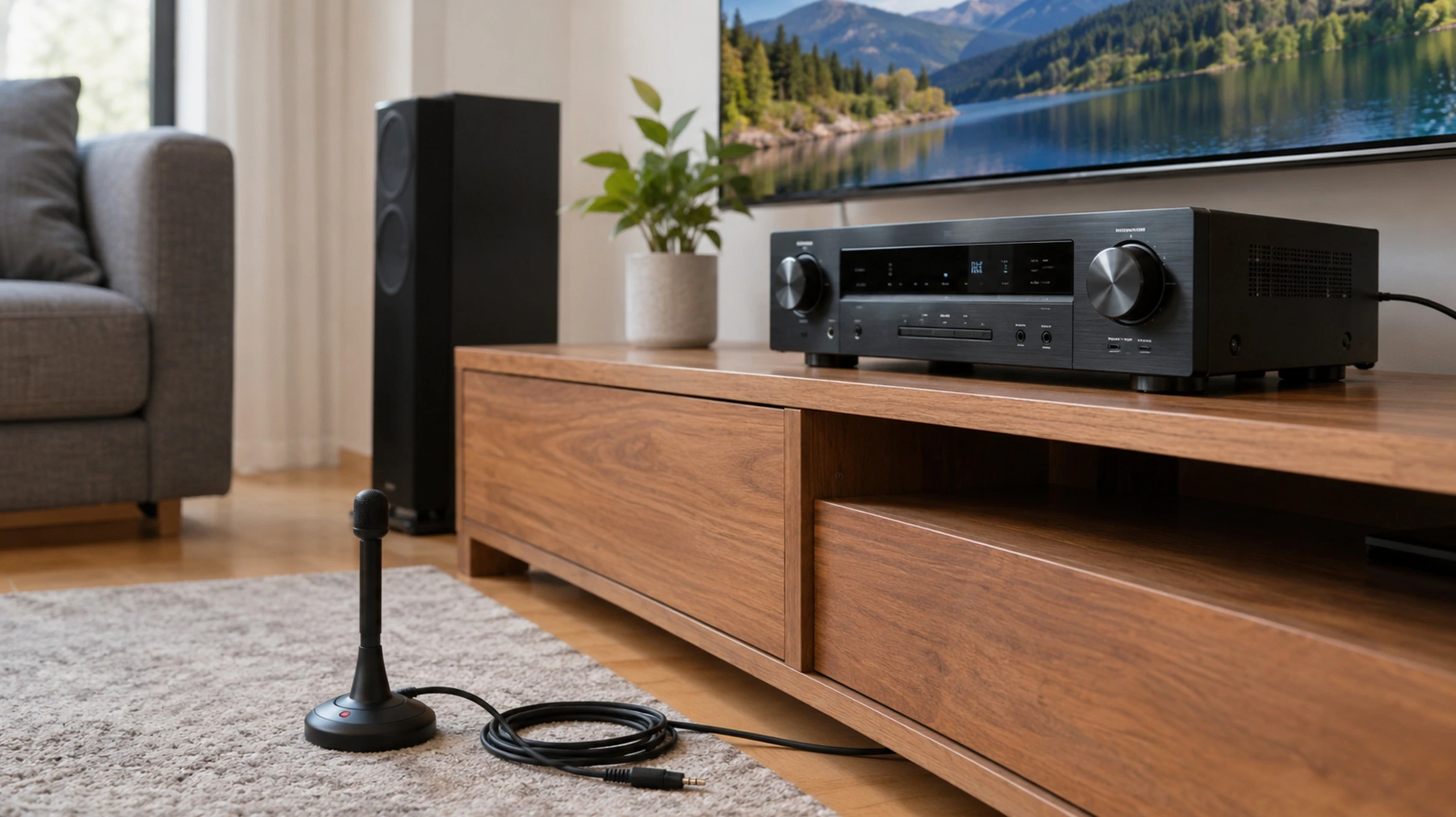
Auto calibration leaves your sound half finished. In a couple of minutes it measures the room with its microphone, balances the levels and works out the distances, and it gets those right almost every time. Where it falls short is elsewhere, in the size it assigns to your speakers, the crossover it picks and a target curve so neutral that a lot of people find it lifeless on movies. That is why it pays to learn how to calibrate AV receiver settings from start to finish, which mostly comes down to knowing what to touch once the wizard is done.
The good news is that you do not need the setup mic to check and finish the job. A sound level meter, a little physics and a sweep measurement let you verify whatever the system left in place. Here is the full walk-through, first with the automatic wizard and then by hand, with the numbers that actually matter (an 80 Hz crossover, a 75 dB reference level and about a foot of distance for every millisecond).
What auto calibration does, and what it misses
Auto calibration nails distances and levels, and it struggles with speaker size and crossover, on top of leaving a neutral reference curve that can sound lean. Every system works the same way. You put its microphone at the listening position, the receiver fires test tones through each speaker and, from what comes back, it works out four things: how far away each speaker sits, how much its volume goes up or down, where it hands the bass over to the subwoofer and what equalization it applies to correct the room.
The snag is that the mic has no idea which speakers you own or what you like. It hears a bookshelf speaker reach down to 45 Hz and marks it large, when the sensible move is to send its bass to the subwoofer. Its default curve, accurate and neutral, also leaves movies without the low-end punch many people want. Calibration is a very good starting point, but it is not the final tune.
The calibration systems, brand by brand
Each manufacturer names its own system, though they all do the same thing: a mic, some test tones and a few minutes of number-crunching. These are the ones you will run into and what is worth knowing about each.
| Brands | System | Notes |
|---|---|---|
| Denon, Marantz | Audyssey (MultEQ, MultEQ XT, MultEQ XT32) | Adds Dynamic EQ and Dynamic Volume; editable with the MultEQ-X app |
| Yamaha | YPAO (Yamaha Parametric room Acoustic Optimizer) | Higher tiers add Reflected Sound Control (R.S.C.) |
| Pioneer | MCACC (Multichannel Acoustic Calibration) | MCACC Pro on the top models |
| Sony | D.C.A.C. (Digital Cinema Auto Calibration) | Measures phase as well as level and distance |
| Onkyo, Integra | AccuEQ (with AccuReflex) | Fitted to the entry-level model we reviewed |
| Several brands | Dirac Live (paid) · Anthem ARC Genesis (free) | Correct phase too; sometimes bundled in |
How to calibrate AV receiver settings step by step
The steps to calibrate AV receiver settings with the automatic wizard never change, whether it is Audyssey, YPAO or anything else. You prep the room, get the subwoofer ready, place the mic in the exact spot, run the measurement and save the result. It helps to have the speakers well positioned first, a separate job with its own layout rules. The gap between a good measurement and a poor one is almost all in the prep.
Prep the room and place the microphone
Silence rules. Turn off the AC, close the windows and move anything that hums out of the way, because the system is measuring sound and background noise feeds it error. Plug the setup mic into the front input and mount it on a tripod at seated ear height, aimed at the ceiling rather than the speakers. Put it in your usual spot, the middle of the couch, not some odd corner you never sit in.
Get the subwoofer ready before you measure
Set the subwoofer up before you run Auto Setup, since the system measures whatever you hand it. Turn its own low-pass filter all the way up or to the LFE/bypass position, so the receiver decides the crossover and you do not stack two filters cutting the bass. Leave phase at 0 (flip it to 180 only if the bass integrates worse afterward) and set the sub’s gain so that, when it measures, the receiver does not have to trim it much and its level lands near the middle of the dial.
Run the wizard and follow the tones
Launch Auto Setup from the settings menu, with the receiver hooked to the TV over HDMI so you can read the prompts. It fires sweeps and pink noise through each speaker, the subwoofer included, while it figures out which ones are connected. Those tones are fairly loud, so do not do it late at night or with the volume cranked. If it asks you to move the mic to the surrounding seats, do it, because that widens the well-tuned area instead of nailing a single point.
Save it and note what it worked out
Save the result and jot down what it set for each speaker before you leave the menu. The unit has already worked out distances, levels and crossovers, and that snapshot of the after state is what you will review next. It also lets you roll back if a manual tweak ends up sounding worse than what was there.
What to check and fix after auto calibration
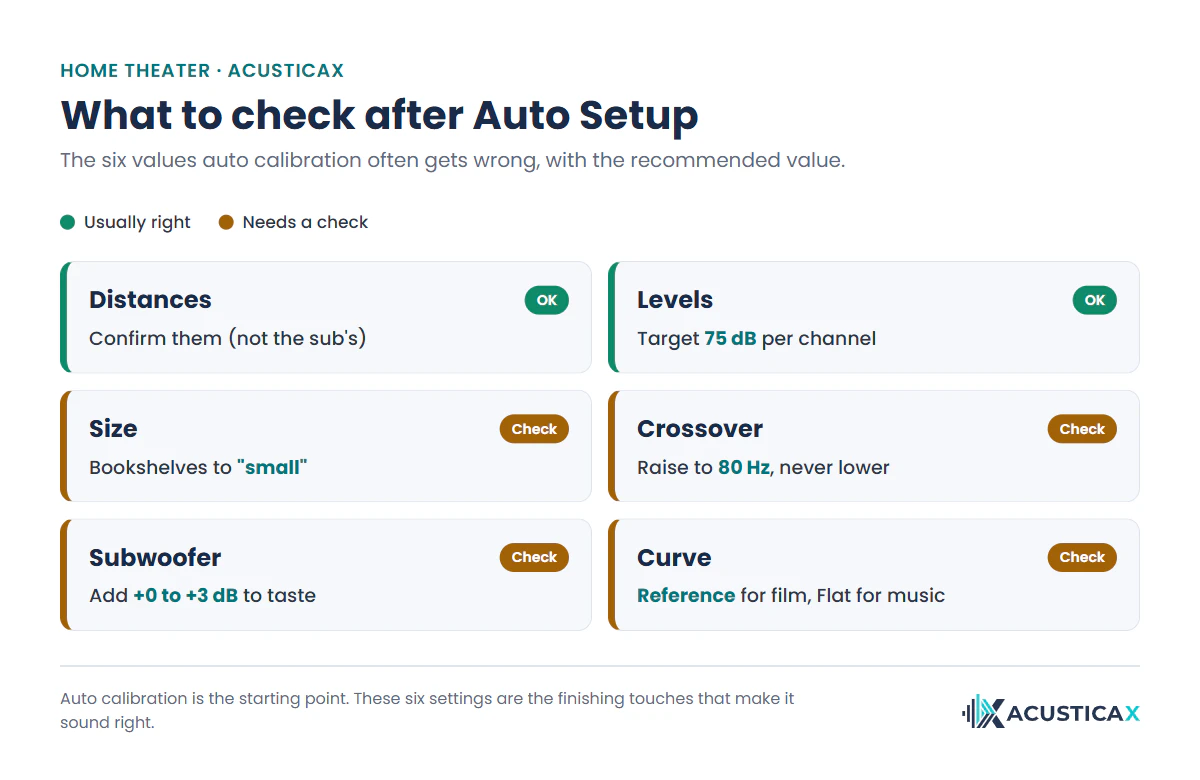
After Auto Setup, six values tend to need work: the size of the speakers, the crossover, the distances, the levels, the subwoofer level and the target curve. None takes more than a minute in the receiver’s speaker menu, and they are what separates an average calibration from one that genuinely sounds good.
Set almost every speaker to “small”
Switch every satellite and bookshelf speaker to “small”, as long as you have a subwoofer, even if the system called them large. That way the receiver diverts the deepest bass to the sub, which is what it is for, and it takes the load off both the amplifier and speakers that were never built for the lowest notes. Without a subwoofer it is different, and there you want a couple of speakers left “large” so you keep any bass at all. Leave floorstanders that genuinely reach low without strain on “large” too.
Set the crossover, usually to 80 Hz
Set the crossover to 80 Hz for satellites and bookshelf speakers, the THX reference value. Auto calibration sometimes drops it too low, to 40 Hz, and loads a small cabinet with bass, so raise it to 80 Hz without worry, or to 100 or 120 Hz if the speaker is tiny. What you must never do is lower a crossover the system left high, at 100 or 120 Hz, because that means the speaker does not reach any deeper and forcing it there punishes the driver. Large floorstanders take a lower crossover, 40 to 60 Hz, depending on how full you want the bass.
Check the distances, except the subwoofer’s
Check that the speaker distances match reality, because the receiver turns them into a delay so every speaker reaches your seat at once. The exception is the subwoofer, whose distance comes out longer than the real one on purpose, since the system adds the delay of its internal filter and electronics, so leave that one alone. For the rest, correct by hand only if a figure is off by a foot or two from the tape, because a few inches are neither audible nor usually within the menu’s step.
Match the levels between channels
Confirm that every channel is equally loud from your seat, which is what the system nails apart from the subwoofer. With an uncalibrated meter, like the one on your phone, what matters is that they all read the same number, not the absolute value, because the mic’s error is common to every channel and cancels out. The usual reference is 75 dB per channel with the internal test tone. How to measure it without the setup mic is in the next section.
Give the subwoofer the boost you like
Nudge the subwoofer about +3 dB above the calibrated value, a taste boost (the so-called house curve) that hands movies back the punch a neutral response strips out. You can go to +6 dB if you love impact, but this is a by-ear call, not a number, so check it with a sweep before you overdo it, because the phone mic does not measure well down there and too much bass buries the dialogue. And if the bass is uneven depending on where you sit, the culprit is placement, so try to find the best spot for your subwoofer before touching the volume.
Decide what to do with the curve and the extras
Try both target curves before you settle. The Reference curve, the one the system sets by default, softens the treble a touch so movies do not turn harsh, while the Flat curve leaves it untouched and tends to suit music. Among the extras, Dynamic EQ helps when you listen quietly, because it makes up for the bass and treble your ears lose below reference volume; keep in mind it already boosts the bass, so do not pile it on top of the +3 dB sub boost without listening to the whole. Dynamic Volume, on the other hand, evens out loud hits and quiet passages for late-night viewing, and it is worth turning off if you are after fidelity. If you want to edit the calibration by hand, the Audyssey MultEQ-X app lets you shape the curve parameter by parameter.
| Setting | Does auto get it right? | What to leave yourself |
|---|---|---|
| Distances | Yes, very reliable (the sub’s runs longer on purpose) | Leave them; fix only a big error, never the sub’s |
| Levels | Yes, it matches the channels | All reading the same, 75 dB reference |
| Size | Not reliable | Bookshelves to “small” (with a subwoofer) |
| Crossover | Not reliable | 80 Hz or higher; never below what it set |
| Subwoofer level | Left neutral | +3 dB to taste (up to +6, checked with a sweep) |
| Target curve | Reference by default | Reference for film, Flat for music |
How to calibrate and verify without the setup mic
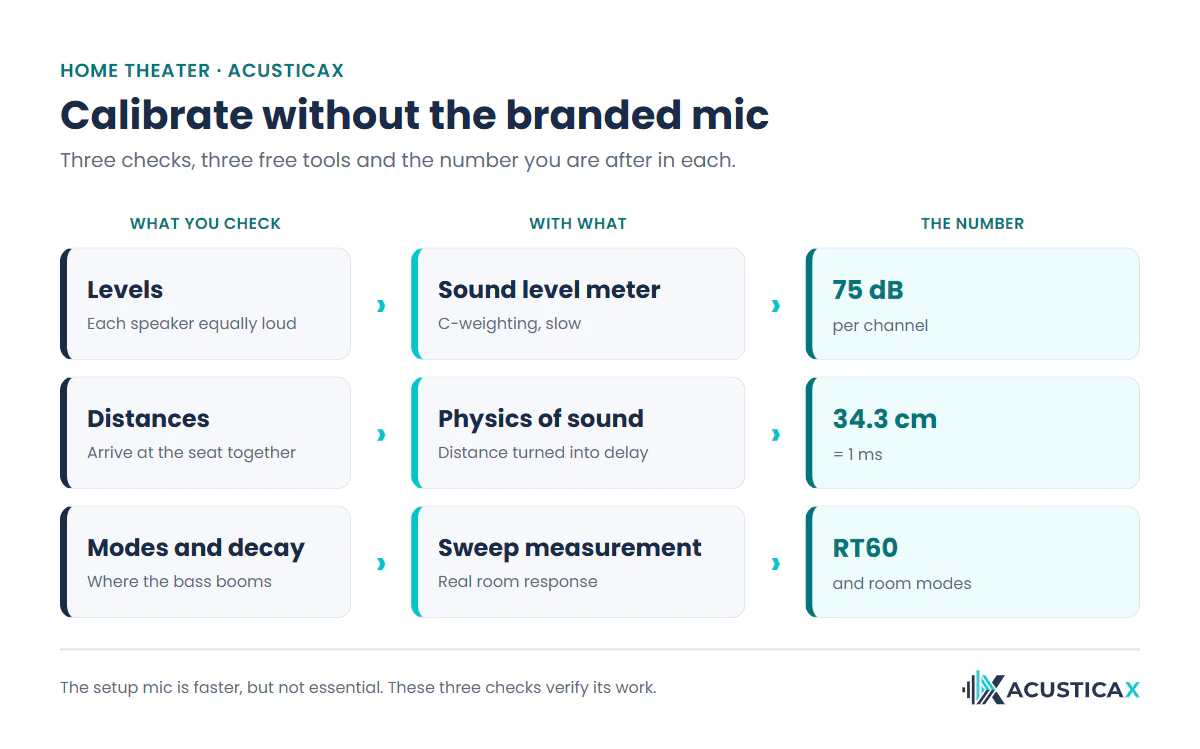
You can calibrate and check the receiver without its mic using three free tools: a sound level meter for the levels, physics for the distances and a sweep measurement for the room modes. It is what enthusiasts did before Auto Setup existed, and it still works to confirm the automatic run did not slip up, or to set up a receiver whose mic has gone missing.
Levels, with a sound level meter
Match the channels with an SPL meter set to C-weighting and slow response, at ear height and aimed at the ceiling. Turn the master volume to its reference (0.0 dB on Denon or Marantz; on the 0-100 scale other brands use, the point the manual gives), switch on the internal test tone and trim each channel until they all read the same, around 75 dB. Your phone works, with the usual caveat that uncalibrated it is a ballpark (±10 dB), so trust the channels matching rather than the exact figure, and for the sub’s low end reach for a sweep instead, because the phone mic loses sensitivity below 100 Hz. Our sound level meter for checking each speaker runs in the browser with nothing to install.
Distances, with the physics of sound
Measure each speaker’s distance to the seat with a tape and leave it in the menu, since the receiver turns it into a delay to line up the arrivals. Sound travels at about 1,125 feet per second (343 m/s at 68 °F), so every foot works out to roughly a millisecond. For a living room, the tape is enough. If you build something more ambitious, with two speakers playing at once, you can measure the real delay between their arrivals with the mic using our acoustic time-alignment tool.
Modes and decay, with a sweep
Play a frequency sweep and record the room’s response to see what no receiver number tells you, which notes the bass booms on and how long the sound takes to die away. Those peaks are the room’s own modes, and not even the best calibration erases them, it only softens them. With our tool for measuring your room’s modes and reverberation time you see it on your phone and know whether the problem is a setting or the acoustics.
Common mistakes when calibrating the receiver
Most trouble after calibrating comes down to five common mistakes. Going over them saves hours of circling the menu wondering why the sound never quite clicks.
- Leaving everything “large”. The bass spreads across cabinets that cannot handle it and the subwoofer sits half idle.
- Lowering a crossover the system set high. That speaker does not reach any lower, so you only raise a crossover, to 80 Hz or more on small cabinets.
- Overwriting the subwoofer distance with the tape. Its distance includes the internal delay on purpose; changing it pulls the bass out of step with the mains.
- Cranking the subwoofer blindly. It booms, buries the dialogue and fools your ears; add a little and check with a sweep before going past +6 dB.
- Calibrating from a seat you never use. The system optimizes the mic spot, so put it where you actually sit.
And one check beforehand that saves headaches. Before you calibrate, make sure each speaker is getting its own channel. If moving the mic shows one is missing or the center is feeding the wrong side, go over it with the channel test that confirms each speaker plays where it should. And if a speaker goes dead silent after calibrating, it is nearly always the connections or the audio format rather than the settings, which our guide on what to do when a channel loses sound sorts out.
Frequently asked questions
How often should you recalibrate the receiver?
Recalibrate whenever you change something physical in the room, be it moving a speaker or the subwoofer, shifting the couch, or adding a thick rug and curtains. Those changes alter the distances and the sound reaching your seat, so the old calibration goes stale. If you touch nothing, there is no need to run it again.
Should I change the subwoofer distance if it does not match the tape?
No. The system deliberately adds the delay of its filter and electronics, so the subwoofer distance comes out longer than the real one and that is correct. Overwrite it with the tape measure and you break its integration with the mains right at the crossover. It is the one distance in the menu you leave alone.
Is a phone mic good enough to set the levels?
It is fine for matching the channels, not for hitting an absolute value. Uncalibrated it runs about ±10 dB off, but that error is the same on every channel, so what counts is that they all read the same number. For the subwoofer’s low end, below 100 Hz, the phone mic loses sensitivity, and there a sweep beats the meter.
What crossover should I set for the speakers?
80 Hz for satellites and bookshelf speakers, the THX reference, and 100 or 120 Hz if the speaker is very small. Floorstanders that truly reach low take a lower crossover, 40 to 60 Hz. The rule that never fails is that you raise a crossover, never drop it below what the system left, because there the speaker no longer reaches.
Can I calibrate without the mic that comes with the receiver?
Yes. Levels are matched with an SPL meter on C-weighting and slow response, leaving every channel on the same number, around 75 dB, with the internal tone. Distances go in with a tape, since the receiver turns them into a delay. And the room modes come from a sweep measurement. The setup mic is quicker, but it is not essential.
How much should I raise the subwoofer level?
Start at +3 dB over what the system left and go by ear up to +6 dB at most. It is not an exact figure but a boost, the house curve, that gives movies the impact a neutral calibration takes away. Check it with a sweep before you overdo it, because too much bass buries voices and tricks your ears into thinking it sounds better.
What are Audyssey Dynamic EQ and Dynamic Volume?
They are two different extras. Dynamic EQ makes up for the bass and treble your ears lose when you listen below reference volume, so it genuinely helps at night or at low levels. Dynamic Volume evens out loud peaks and quiet stretches, handy for not waking anyone but no friend of fidelity. Try them one at a time and keep whatever convinces you.
Does calibration fix the room acoustics?
No. Calibration adjusts the receiver electronically, which corrects levels, distances and part of the response, but it does not change how sound bounces off the walls. If the room booms or the sound smears, you need to treat the acoustics with panels and absorbers. Calibrating the receiver and treating the room are two separate jobs that work together.